RK3568-based Fully Localized Identity Verification All-in-One Machine Project, Supports Customization and HarmonyOS
The identity verification terminal solution is built around the AIoT-3568A AI motherboard as its core platform, offering comprehensive support for the system, identity recognition, and an ecosystem of other peripheral accessories. This article will delve into the project overview, application scenarios, system architecture, peripheral specifications, and testing methodologies involved in deploying a fully localized identity verification all-in-one machine.
Project Overview
Project Application Scenarios
The identity verification terminal is designed for various application scenarios, including:
- Identity Verification: Used in government agencies, enterprises, public institutions, and financial institutions to verify identities.
- Real-name Registration: Facilitates real-name registration in accommodation establishments such as hotels, guesthouses, and apartments.
- Security Checks: Employed at transportation hubs like train stations, airports, and ports for security checks.
- Event Verification: Utilized for entry verification at large events such as exhibitions, concerts, and sports events.
- Other Identity Verification Needs: Applicable in any scenario requiring identity verification.
Target Audience
The target audience for this solution includes:
- Personnel from government agencies, enterprises, and financial institutions.
- Staff from accommodation establishments.
- Security personnel at transportation hubs.
- Organizers and security personnel for large events.
- Individuals and organizations requiring identity verification.
System Architecture and Key Modules
System Architecture Diagram
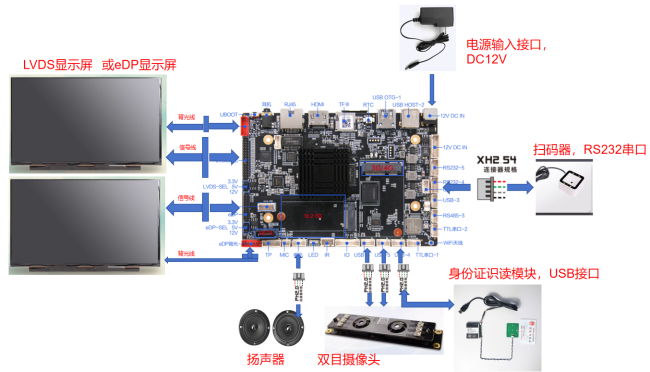
Note: Ensure correct connections for LVDS and EDP screen lines to avoid damage. Additionally, verify the power voltage and pin sequence for peripherals like ID card modules or QR code scanners before connecting.
Peripheral Specifications
The system includes several key functional modules:
- Dual-Camera Module: Captures facial images for facial recognition functionality.
- QR Code Scanner: Scans QR codes such as health codes or tickets.
- ID Card Reader: Reads information from ID cards, including name, ID number, and photo.
1. ID Card Reader Module
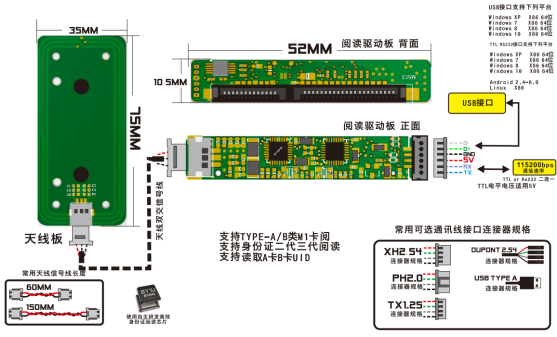
- Purpose: Reads ID card information to compare with facial recognition results for authenticity.
- Important Notes:
- Interfaces can be USB or TTL RS232.
- For serial communication, ensure a baud rate of 115200 and appropriate voltage levels (some support 5V, others only 3.3V).
- Antenna board design should consider reading distance without excessive thickness that could affect signal transmission.
2. QR Code Scanning Module
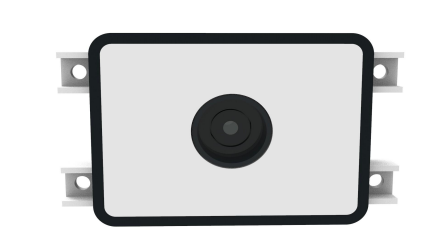
- Purpose: Scans QR codes to validate their authenticity.
- Important Notes: Interfaces can be USB or RS232.
3. Camera Module
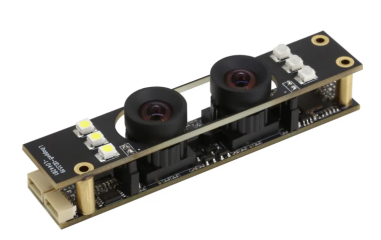
- Functionality: Captures facial images to compare against stored templates for verification.
- Important Notes:
- Generally uses USB interfaces; ensure the camera operates within the required current limits.
- Some models may require dual USB connections for color and infrared cameras.
PCBA Assembly Process and Methods
PCBA Interface Function Diagram
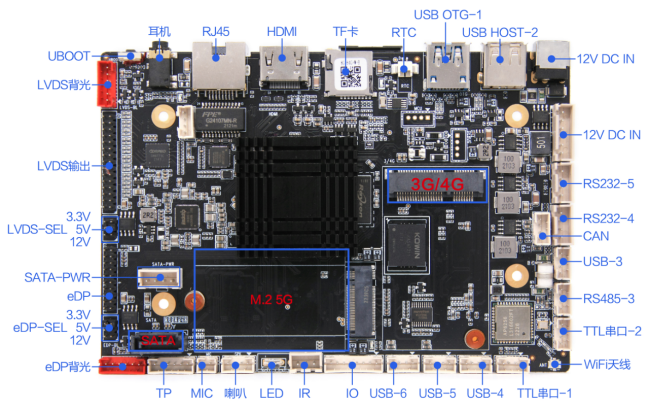
Assembly Process Steps
- Prepare the corresponding PCBA and relevant hardware modules, along with the specification documents for reference.
- Familiarize yourself with the various interfaces on the motherboard, including LVDS and EDP signal output interfaces.
- Adjust screen voltage connections according to the specifications.
- Connect the display, ensuring to include backlight connections.
- Connect multiple peripherals through the available USB ports.
- Ensure correct voltage levels for TTL and RS232 serial ports.
Screen Configuration Steps
- Understand the LCD display principles.
- Obtain the LVDS screen specification document.
- Confirm hardware-related matters such as LVDS screen VCC voltage and data lines.
- Modify screen parameters as necessary.
- Use a USB drive formatted to FAT32 with the appropriate configuration file to set screen parameters.
Example Screen Parameters
cpu_id=3568; // Platform is RK3568
disp_main=lvds; // Main screen is LVDS
lvds_x=1920; // X direction pixel count
lvds_y=1080; // Y direction pixel count
lvds_dclk_freq_khz=148000; // Clock frequency
...
Peripheral Functionality Testing and Aging Tests
Peripheral Testing
- ID Card Module Testing: Power on the device and use testing tools to read ID card information.
- Camera Testing: Use the factory testing tools to preview and capture images.
- QR Code Module Testing: Power on and scan a supported QR code to verify data retrieval.
Aging Testing
Conduct aging tests to ensure the device operates under various environmental conditions, including high and low temperatures, to validate reliability and performance.
Conclusion
This identity verification terminal solution, based on the RK3568 platform, provides a robust framework for various identity verification applications. By following the outlined assembly and testing procedures, users can ensure the system operates effectively and reliably in real-world scenarios.