RK3568-based Fully Localized Dual-screen Visitor Machine Project, Supports HarmonyOS, Supports Customization
The dual-screen visitor machine solution is centered around the AIoT-3568A AI motherboard, providing a robust platform for identity recognition and peripheral accessory integration. This solution is particularly relevant in various applications, including visitor registration, management, and verification across multiple sectors. In this post, we will delve into the project overview, application scenarios, and essential components of the dual-screen visitor machine, as well as the setup process and key considerations.
Project Overview
The dual-screen visitor machine is designed to enhance the visitor management process in various environments. It functions as a comprehensive system for identity verification and registration, utilizing advanced technologies to streamline operations.
Project Application Scenarios
-
Visitor Registration: This system can be implemented in government agencies, enterprises, and commercial buildings to facilitate efficient visitor registration processes.
-
Visitor Management: Schools, hospitals, and hotels can utilize this solution for managing visitors effectively, ensuring security and proper record-keeping.
-
Entry Verification: The machine is ideal for large-scale events such as exhibitions, concerts, and sports competitions, where it can validate entry tickets and manage crowd control.
-
Other Applications: Any organization requiring visitor management can benefit from this dual-screen solution, enhancing security and operational efficiency.
System Framework and Key Modules
The system architecture consists of several key modules that work together to provide comprehensive functionality:
System Diagram
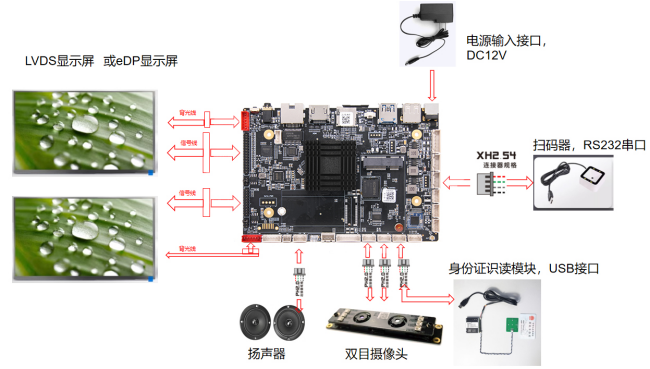
Important Notes:
- Ensure correct connections for LVDS and EDP screen lines to prevent damage.
- Pay attention to power supply voltage and wiring sequence when connecting peripherals like ID card readers or QR code scanners.
Functional Modules
-
Stereo Camera: Captures facial images for identity verification.
-
QR Code Scanner: Reads QR codes for entry validation, such as health codes or tickets.
-
ID Card Reader: Extracts information from ID cards, including names and identification numbers, to ensure identity authenticity.
Peripheral Specifications
1. ID Card Reader Module
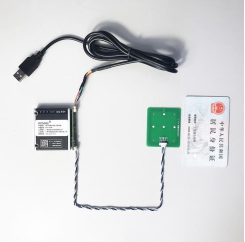
Module Purpose: Reads ID card information and compares it with facial recognition results to verify identity.
Key Considerations:
- Use USB or TTL RS232 interfaces for connection.
- Ensure the communication speed is set to 115200 for serial communication.
- Design the antenna board to optimize reading distance without obstructing signal transmission.
2. QR Code Scanning Module
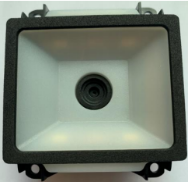
Module Purpose: Scans QR codes to validate their authenticity.
Key Considerations:
- Ensure compatibility with your system's hardware and software.
- Maintain optimal scanning distance and angle for effective reading.
- Regularly clean the scanning window to ensure efficiency.
3. Camera Module
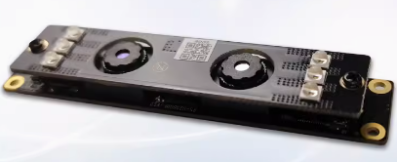
Module Function: Captures facial images for comparison with stored templates to verify identity.
Key Considerations:
- Use USB interfaces, ensuring sufficient power supply for the camera.
- Some cameras may require dual USB connections for optimal performance.
PCBA Assembly Process
PCBA Interface Functionality
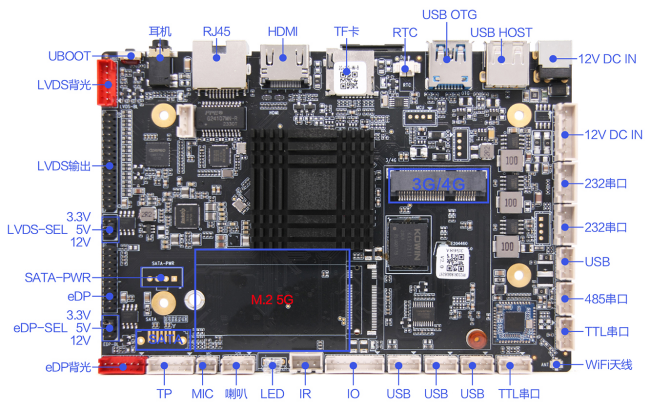
Assembly Steps
- Prepare the necessary PCBA and hardware modules, along with reference specifications.
- Familiarize yourself with the motherboard interfaces, including LVDS and EDP connections.
- Adjust the display voltage according to the specifications.
- Connect the display, ensuring to include backlight connections.
- Connect multiple USB peripherals as needed.
- Ensure TTL and RS232 serial ports are correctly powered according to their specifications.
Display Configuration
Configuration Steps
- Understand the LCD display principles.
- Obtain the LVDS screen specifications.
- Confirm hardware details, including voltage and data lines.
- Modify screen parameters as necessary.
- Use a USB drive to configure settings, ensuring it is formatted to FAT32.
Example Screen Parameters
cpu_id=3568; // Platform is RK3568
disp_main=lvds; // Main display is LVDS
lvds_x=1920; // X direction pixels
lvds_y=1080; // Y direction pixels
lvds_dclk_freq_khz=148000; // Clock frequency
These parameters are crucial for ensuring the correct display settings and performance. Adjust them based on the specific requirements of the display used.
In conclusion, the RK3568-based dual-screen visitor machine is a versatile solution that enhances visitor management across various sectors. By understanding its components, assembly process, and configuration, organizations can implement an effective system tailored to their needs.