Overall Software Design of an Intelligent Service Robot Vision System Based on the Jetson Platform with Embedded GPU
1. Introduction
With the rapid development of science and technology and the continuous improvement of living standards, the demand for service robots is increasing daily. Currently, service robots are gradually playing important roles in various fields such as medical care, home cleaning, and entertainment education, effectively helping people free themselves from tedious daily tasks. This paper designs and implements intelligent service robot vision system software for home and office application scenarios, utilizing NVIDIA's embedded GPU processor, Jetson TX2. The software features five functions: object detection, face recognition, speech recognition, speech synthesis, and stereo ranging. It can be applied in the design of vision systems for various intelligent service robots, possessing significant practical application value.
2. Overall Software Design
2.1 Requirements Analysis
The intelligent service robot vision system software in this paper is primarily designed for robot applications in home and office settings, aiming to assist people with daily tasks. The software design involves functions such as object detection, face recognition, human-robot voice interaction, and visual ranging. Object detection and face recognition involve deep convolutional neural network algorithms, while visual ranging involves algorithms like OBR feature point detection. The overall complexity and computational load of these algorithms are substantial, and all functions are to be performed on an embedded device, requiring high performance from the embedded processor. The Jetson TX2 is a new generation of embedded AI computing device launched by NVIDIA, powered by the NVIDIA Pascal architecture, integrating deep learning capabilities and rich I/O interfaces, all in a compact form factor with a power consumption of only 7.5 watts. Its excellent performance, powerful design, and simple system integration make the Jetson TX2 highly suitable for intelligent devices such as robots, drones, smart cameras, and portable medical equipment, meeting the basic hardware requirements for the software development in this paper.
2.1.1 Software Function Analysis
(1) Object Detection Function
The object detection function needs to detect and locate target objects in an image. It requires identifying whether specified multiple classes of objects appear in the image and indicating their class and position within the image.
(2) Face Recognition Function
The face recognition function needs to identify detected faces and determine if they are present in the face database. If a face is found in the database, its corresponding name must be provided.
(3) Human-Robot Interaction Function
The human-robot interaction function enables communication between the robot and humans through voice. This function involves recognizing and understanding the voice of the interaction partner, and then executing the commands contained within the voice. During interaction, the interaction information is synthesized into speech and delivered to the interaction partner.
(4) Ranging Function
The ranging function is used to measure the distance from a specified target object to the robot, implemented using stereo vision. This function combines the object detection and human-robot interaction functions. Through human-robot interaction, the target object to be measured is specified. Using the position of the target object in the left image obtained from the object detection function, the imaging area of the target object in the right image is predicted. Features of the target object in these two areas are extracted and matched, finally completing the ranging.
2.1.2 Software Performance Analysis
(1) Object Detection and Face Recognition Algorithm Performance
In this paper, deep convolutional neural networks will be used for object detection and recognition. Deep convolutional neural networks involve many convolution and matrix operations, which are computationally intensive. However, since these operations are independent of each other, parallel computing can be employed to improve the computational efficiency of deep convolutional neural networks. The Jetson TX2 development platform features a 256-core Pascal GPU and supports the CUDA framework software library. Using CUDA technology, these 256 cores can be chained together to act as thread processors to solve parallel computing problems, with each core capable of exchanging, synchronizing, and sharing data.
(2) Speech Recognition Performance
The intelligent service robot vision system software involves a speech recognition function, which needs to be accurate and fast. Since object detection and face recognition algorithms occupy most of the resources on the Jetson TX2, this paper will use iFlytek's online speech recognition API. The iFlytek Open Platform boasts leading speech recognition technology, with core technologies reaching internationally advanced levels and speech recognition accuracy exceeding 98%. The Jetson TX2 development platform includes a WiFi module, allowing the robot to connect to the network while moving without restriction.
(3) Ranging Performance
The ranging method in this paper differs from other traditional matching methods; it performs feature matching based on the object's position obtained from the object detection function. The Jetson TX2's development kit, JetPack, supports OpenCV4Tegra, which is a hardware-accelerated version of standard OpenCV on CPU and GPU, containing many image processing, computer vision, and machine learning methods.
2.2 Software System Framework Design
2.2.1 Hardware Platform Overview
The Jetson TX2 module processing components are shown in Figure 2-1:
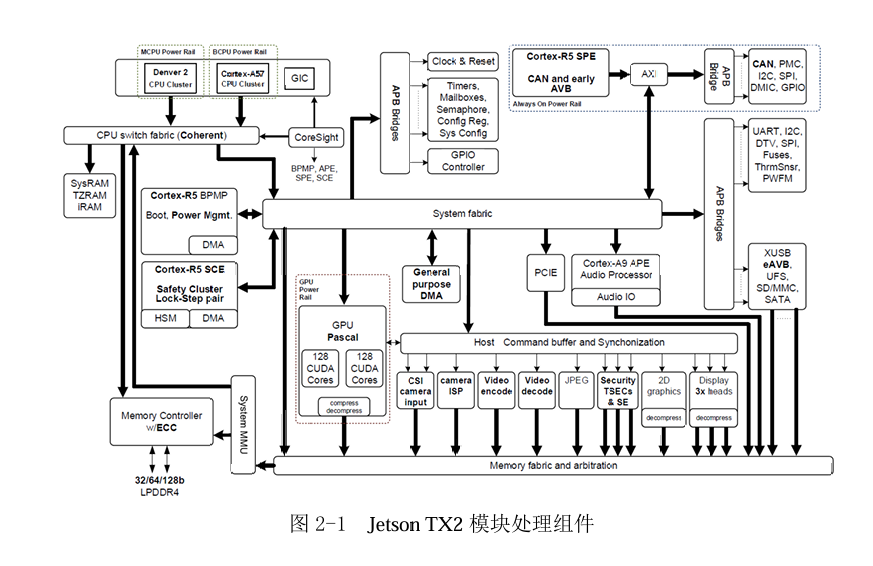
The Jetson TX2 module includes the following processing components:
(1) 256-core NVIDIA Pascal GPU. Fully supports all modern graphics APIs, unified shaders, and GPU computing. Supports all features found in other discrete NVIDIA GPUs, including a large number of computing APIs and libraries, including CUDA. Highly power-optimized for optimal performance in embedded projects.
(2) ARM Cortex-A57 MPCore (quad-core, 2.0GHz) and Denver2 (dual-core, 2.0GHz) multi-processor CPUs. The two CPU clusters are connected via an NVIDIA-designed high-performance interconnect structure, enabling simultaneous operation of both CPU clusters for a true heterogeneous multi-core environment. The Denver2 CPU cluster is optimized for single-threaded performance, while the ARM Cortex-A57 MPCore CPU cluster is better suited for multi-threaded applications and lighter loads.
(3) Advanced HD video encoder, capable of recording 4K resolution 60fps ultra-HD video. Supports H.265 and H.264 BP/MP/HP/MVC, VP9, and VP8 encoding.
(4) Advanced HD video decoder, capable of playing 4K resolution 60fps ultra-HD video, up to 12-bit pixels. Supports H.265, H.264, VP9, VP8 VC-1, MPEG-2, and MPEG-4 video standards.
(5) Two multi-mode (eDP/DP/HDMI) outputs and up to 8 channels of MIPI-DSI output. Multi-line pixel storage allows for more memory-efficient scaling operations and pixel extraction. Hardware display surface rotation is also provided to reduce bandwidth in mobile applications.
(5) 128-bit memory controller, 128-bit DRAM interface, supporting LPDDR4. The Jetson TX2 integrates 8GB LPDDR4 and 32GB eMMC.
(6) 1.4 Gpix/s advanced Image Signal Processor (ISP).
(7) Audio processing engine. The audio subsystem provides hardware support for multi-channel audio through multiple interfaces.
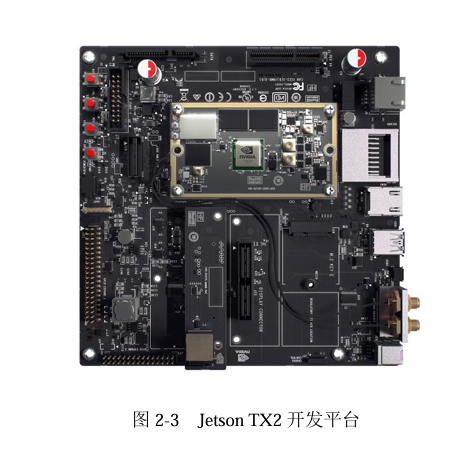
The Jetson TX Development Board includes the following interfaces and peripherals:
(1) HDMI 2.0, supporting resolutions up to 3840x2160 at 60Hz.
(2) WiFi, with a maximum transmission rate of 867Mbps.
(3) USB3 and USB2 interfaces.
(4) Bluetooth 4.1, with a maximum transmission rate of 3MB/s.
(5) 100M Ethernet port.
(6) Dual CAN bus.
(7) SATA, SD card interface.
In summary, the Jetson TX2 integrates an embedded GPU for deploying computer vision and deep learning, while also featuring an advanced Image Signal Processor (ISP) and an audio processing engine. It fundamentally meets the functional and performance requirements for the software development in this paper, thus the Jetson TX2 is chosen as the software development platform.
2.2.2 Software Framework Design
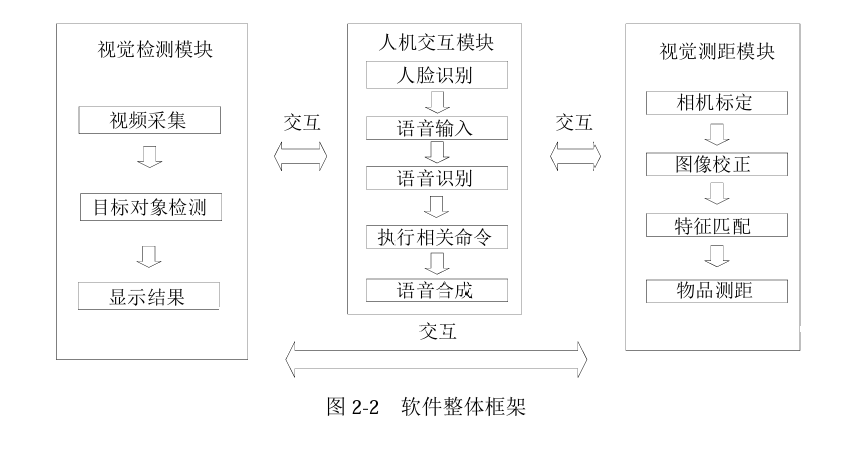
Based on the software function and performance analysis, and combined with the characteristics of the Jetson TX2 development platform, the overall framework design of the intelligent service robot vision system software primarily consists of three major modules and their sub-modules: the Visual Detection Module, the Human-Robot Interaction Module, and the Visual Ranging Module. The software framework is shown in Figure 2-2.
The Visual Detection Module is mainly responsible for processing steps such as video acquisition, object detection, and displaying recognition results. Detected objects will be sent to the Visual Ranging Module for visual ranging, and detected faces will be sent to the Human-Robot Interaction Module for human-robot interaction.
The Human-Robot Interaction Module is mainly responsible for tasks such as face recognition, voice input, speech recognition, executing relevant commands, and speech synthesis. It will decide whether to initiate human-robot interaction based on the face recognition results. Commands to pick up items will send the item's name to the Visual Ranging Module.
The Visual Ranging Module is mainly responsible for processing tasks such as camera calibration, image rectification, feature matching, and item ranging. The items requiring ranging are obtained from the Human-Robot Interaction Module, and the ranging results will be sent to the Visual Detection Module for display.
2.2.3 Software Development Plan
The software development plan and process are as follows:
(1) Development Environment Setup
Development environment setup includes setting up the Jetson TX2 development environment and the server for model training. The detailed process for setting up the software development environment is described in the next section. Before development, the Jetson TX2 requires installation of the NVIDIA JetPack SDK. The NVIDIA JetPack SDK is a solution for building AI applications. The JetPack installer flashes the Jetson TX2 with the latest operating system image, installs development tools for both the host and Jetson TX2, and installs the necessary libraries, APIs, samples, and documentation for the development environment.
Server setup requires establishing the Darknet runtime environment. Darknet is used for training the YOLOv2 network. Darknet is an open-source neural network framework written in C and CUDA, supporting both CPU and GPU computing.
(2) Visual Detection Module Development
The visual detection module is primarily based on deep convolutional neural networks. First, images of the detection objects are collected to create a training set, and images of the detection objects are captured to create a test set. Next, the neural network is modified to meet the recognition requirements of this paper. Then, the network is trained with the training set to obtain its weights, and the detection effect is verified with the test set. Finally, the network is optimized and accelerated using the TensorRT inference framework.
(3) Human-Robot Interaction Module Development
The human-robot interaction module interacts through voice, similar to human-to-human communication. The human-robot interaction module first uses a deep convolutional neural network to recognize detected faces. If a face from the face database is recognized, voice interaction is initiated. Then, a Ugreen USB external sound card is used to open the microphone and collect voice. The collected voice is uploaded via the internet to the iFlytek cloud server for online recognition. Understanding the recognition result yields corresponding commands. Finally, relevant operations are executed based on the interaction partner's commands. During interaction, relevant information is synthesized into speech to interact with the partner.
(4) Visual Ranging Module Development
The visual ranging module performs ranging for specified objects using stereo vision. Stereo ranging requires calibrating the stereo camera and using the calibration data to rectify the left and right images so that they meet the requirements for stereo ranging. Then, feature points of the objects in the two images are extracted. Matching these feature points allows for the calculation of disparity values. Substituting the disparity values into the stereo ranging formula yields the object's distance.
2.3 Development Environment Setup
2.3.1 Hardware Development Environment
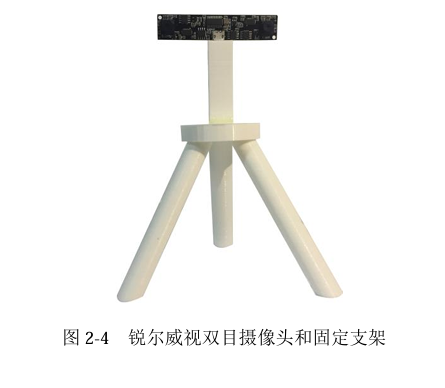
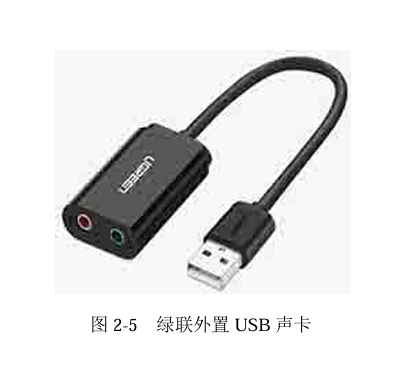
In this paper, the software runs on the NVIDIA Jetson TX2, acquiring video frames through the RER-720P2CAM stereo camera from RealView Technology, and using the Ugreen USB external sound card US205 as an expansion port for acquiring and playing audio data. The hardware platform and external devices are shown in Figures 2-3, 2-4, and 2-5:
The features and functions of each hardware module are shown in Table 2-1:
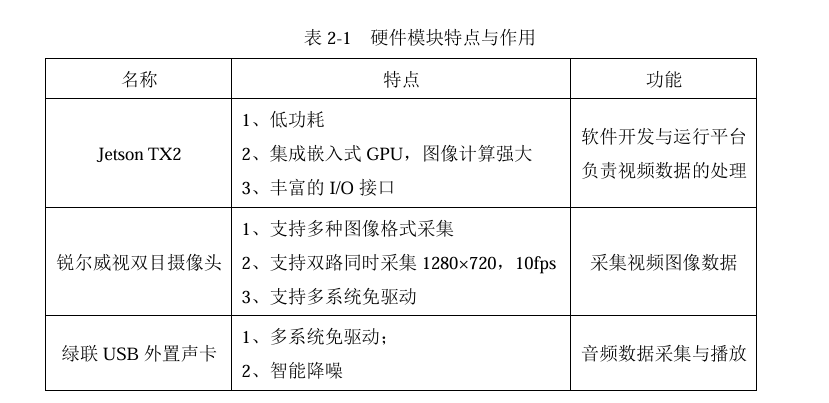
The basic workflow includes: The stereo camera acquires left and right images and transmits them to the Jetson TX2. The Jetson TX2 processes the left image using the YOLOv2 network. If a face is recognized, the Ugreen USB external sound card is used to open the microphone and collect audio data. Through the recognition of audio data, relevant commands are executed, and then the Ugreen USB external sound card is used to open the speaker to play synthesized speech for interaction. If the interaction partner needs an item, the left and right images are used for ranging.
2.3.2 Software Development Environment
(1) JetPack Software Package Installation
The Jetson TX2 development board comes pre-installed with only the Ubuntu 14.04 operating system, without the necessary development environment. Therefore, the Jetson TX2 needs a firmware upgrade using the JetPack development toolkit provided by NVIDIA. This paper uses JetPack 3.2, which includes the Ubuntu 16.04 operating system, CUDA 9.0 Toolkit, cuDNN 7.0, and more. The specific steps are as follows:
① On the Ubuntu 16.04 host terminal, download JetPack-L4T-3.2-linux-x64_b196.run and add execute permissions to it.
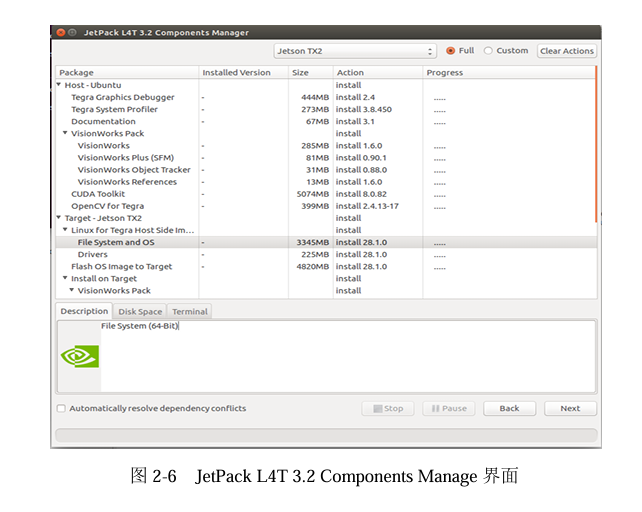
② Run JetPack-L4T-3.2-linux-x64_b196.run on the Ubuntu 16.04 host terminal to enter the JetPack L4T 3.2 Components Manage interface. Select the required components and download and install them, as shown in Figure 2-6.
③ Set the Network Layout. There are two options: "Device accesses Internet via router/switch" and "Device accesses Internet via host machine through setting up a new DHCP server configuration on host". In this paper, the former is chosen, which requires the host and Jetson TX2 to be on the same network segment (i.e., on the same router or switch). During the Jetson TX2 upgrade process, the host and Jetson TX2 must remain connected to the internet.
④ Connect the Jetson TX2 and the host with a Micro USB cable. Power on the Jetson TX2, then press and hold the Recovery button. After three seconds, press the Reset button. Release the Recovery button, and the Jetson TX2 will enter Recovery mode. Then, check on the host side using the lsusb command to see if "Nvidia Corporation" is present. If it is, it indicates that the Jetson TX2 and the host are correctly connected.
⑤ JetPack will upgrade the Jetson TX2's system and install development tools.
(2) TensorFlow Environment Setup
The deep learning network in this paper will run in a TensorFlow environment, so a TensorFlow environment will be set up on the Jetson TX2. TensorFlow is an open-source software library developed by Google for high-performance numerical computation. With its flexible architecture, computational work can be easily deployed to various platforms and devices, providing strong support for machine learning and deep learning, and its flexible numerical computation core is widely used in many other scientific fields. This paper will set up TensorFlow 1.6 on the Jetson TX2, which needs to be compiled and installed in an L4T 28.2, CUDA 9.0 Toolkit, and cuDNN 7.0 environment. The specific steps are as follows:
① Install relevant dependencies, including openjdk, autoconf, libtool, curl, zlib1g-dev, etc.
② Install Bazel. Bazel-0.11.1 needs to be downloaded from GitHub and compiled.
③ Install TensorFlow. Download the TensorFlow source code, export version 1.6, set 8GB of swap memory, and compile using Bazel.
④ After successful compilation, two libraries, libtensorflow_cc and libtensorflow_framework, will be obtained for compilation in a C++ environment.
⑤ Clear the swap memory.
(3) Model Training Server Setup
This paper uses deep convolutional neural networks for object detection, and their training process is extremely computationally intensive, requiring very high processor performance. Currently, deep convolutional neural network training primarily relies on GPUs (Graphics Processing Units). A GPU is a special type of processor with hundreds or even thousands of computing cores, specifically optimized to process massive computational tasks in parallel. Although GPUs are known for 3D rendering in the gaming field, they also excel at running and analyzing deep learning and machine learning algorithms. Therefore, this paper configures the server with an NVIDIA GPU, model TITAN X.
The server-side environment setup steps are as follows:
① Download the graphics card driver (NVIDIA-Linux-x86_64-390.67.run), CUDA 9.0, and cuDNN 7.0 that match the server operating system and graphics card model from the NVIDIA official website.
② Add execute permissions to the graphics card driver file, switch to the tty1 console, and shut down the x-window service. Then, run the driver installation program and wait for the installation to complete.
③ After the driver installation is complete, start the x-window service to enter the graphical interface, then install CUDA and cuDNN.
④ After CUDA and cuDNN are installed, add the corresponding environment variables, navigate to the Darknet folder, and compile its source code.