How Programmers Can Effectively Manage Their Thinking
Abstract: Undoubtedly, we live in an information-rich era. But too much of a good thing can be harmful—excessive information often leads to a scarcity of knowledge and attention. Amid an overwhelming flood of data, it's easy to lose focus. Instead of drifting along the information superhighway, it's better to actively manage your thinking.
— Excerpted from Pragmatic Thinking and Learning: Refactor Your Wetware, published by Turing Education
A good question has no answer. It is not a bolt to be tightened, but a seed to be planted—one that can grow into an oasis of thought.
— John Anthony Ciardi (1916–1986), American poet and critic
Undoubtedly, we live in an information-rich era. But too much of a good thing can be harmful—excessive information often leads to a scarcity of knowledge and attention. Amid an overwhelming flood of data, it's easy to lose focus. Instead of drifting along the information superhighway, it's better to actively manage your thinking.
As in Chapter 6, you need to take a more proactive approach to managing your mind. You must be able to focus on the information you need, filter out the vast amount of irrelevant noise, and access the right information at the right time—neither distracted by trivial details nor missing subtle clues.
In this section of the book, we’ll explore how to better manage your thinking through three key areas:
- Enhancing attention
- Managing your knowledge
- Optimizing your current context
Attention means focusing on areas of interest. You can only attend to a limited number of things at once—everything else slips past your awareness. Many things compete for your attention in any given moment, some worth attending to, most not. We’ll examine methods to strengthen your attention.
Sometimes we use the terms "information" and "knowledge" interchangeably, but they are fundamentally different. Information is raw data in a specific context. For example, "Microsoft acquired several companies for $1 billion" is just a piece of information—information is not in short supply today. Knowledge, however, reveals the meaning behind information. You gain knowledge by spending time, attention, and effort on information. Regarding Microsoft’s acquisition, we might analyze that it will shift market dynamics, create new opportunities, and impact other vendors—this is knowledge. We’ll explore better ways to organize your strategic thinking.
Context, beyond its earlier use in this book, refers to the collection of things you’re currently attending to. For instance, when debugging a program, all variables, object relationships, etc., form your current context. Think of it as the working set of information you’re handling at a given moment.
Understanding these three interrelated themes will help you manage your thinking more effectively.
The First Thing to Do Is Focus
Improving Attention
Back in 2000, while giving a talk on practical programming, I heard a strange news story. In Darby, Pennsylvania, an elderly woman was walking to the grocery store when a young man ran up and violently bumped into her, then fled. Worried about being robbed, she quickly checked her wallet and valuables. Though shaken, she felt okay and continued on to the store.
Inside, she chatted with a few people, bought Oreos and a newspaper, and left. But when she returned home, her daughter screamed—she saw a steak knife embedded in her mother’s neck.
Incredible—how could someone overlook such a severe injury? Under the stress of fearing a robbery, the woman didn’t even notice the pain of being stabbed.
If you can miss something as obvious as a knife in your neck, consider what else might be slipping past your attention.
Attention Scarcity
Your attention is a scarce resource. So many things vie for it every day, yet you can only focus on a fraction.
In multiprocessor systems, there’s a well-known design problem: if not careful, a CPU can spend all its cycles coordinating with other CPUs and never do actual work. Similarly, people can waste attention by scattering it meaninglessly—nothing gets our full focus, and nothing productive gets done.
It’s not always external things competing for your attention. As we saw in Section 4.2, the L-mode (linear mode) of the brain has an idle loop. If nothing more urgent demands attention, it lingers on low-priority concerns—like what to eat for lunch, or replaying a traffic accident or argument. This interferes with R-mode (rich mode—analogous, holistic processing crucial for intuition, problem-solving, and creativity), leaving you operating with only half your brain.
You might often say to yourself: "I’d love to do it, but I don’t have time." Or when a new task arises, you feel you just don’t have enough time to handle it. But time isn’t the real issue. As previously noted (see Section 6.3), time is what you allocate. It’s not that we lack time—it’s that we lack attention. More accurately, you don’t have bandwidth. When your bandwidth—your attentional resources—is overloaded, you miss things. You can’t learn, can’t work effectively, and your family might start thinking you have a brain tumor.
When you truly focus your attention, you can achieve remarkable things. Paul Graham, in his book Hackers and Painters: Big Ideas from the Computer Age [Gra04], noted: "A naval pilot landing a 18-ton aircraft on a carrier deck at 140 mph at night may be safer than a typical teenager slicing a bagel."
I can easily recall, as a teenager, standing patiently by the toaster, my mind wandering. Those thoughts had nothing to do with English muffins, bagels, bread, jam, or the machine in front of me. A young mind drifts easily—and doesn’t necessarily improve with age.
In contrast, the pilot is intensely focused. In that situation, a moment’s hesitation or error means certain death. We need to cultivate that level of focus—even without life-or-death stakes.
Relaxed, Focused Attention
Try this simple exercise. Sit quietly for a moment. Don’t think about yesterday’s mistakes or tomorrow’s problems. Focus on the present—the here and now.
- No distractions.
- No inner monologue.
- I’ll wait.
Not easy, is it? Most meditation, yoga, and similar practices aim for this same goal: quieting the noisy L-mode chatter of the mind, living in the moment, and not needlessly fragmenting your energy—because the internal noise can overwhelm us.
A study published in Public Library of Science - Biology found that meditation training improves attention.
Their test measured how individuals allocate cognitive resources when faced with multiple virtual scenarios and stimuli—sounds a lot like a typical office day...
Participants with extensive meditation training outperformed those with minimal training. But most interestingly, no one meditated during the test. As the paper concludes:
Thus, the results suggest that intensive mental training can produce lasting and significant improvements in the efficient allocation of attentional resources under competing demands—even when subjects aren’t actively using their learned techniques.
In other words, you can focus your attention at any time during the day—not just when meditating or consciously trying. That’s a huge benefit—like gaining stronger, longer-lasting health from physical exercise.
If you want to use your attentional resources more effectively throughout the day, you should learn some basic meditation techniques.
How to Meditate
There are many forms of meditation, from secular to religious. Here, we’ll explore one effective method rooted in Buddhist tradition—but you don’t need to be a Buddhist or do anything special to benefit from it.
You don’t want to daydream, fall asleep, relax, ponder the Great Mystery, or anything like that (other forms of meditation serve those purposes). Instead, you want to sink into a relaxed, open state of awareness—aware of yourself and your context, without judgment or reaction. This is known as Vipassana (insight) meditation. You notice something, but don’t engage in extra thinking. Let it be.
In this style of meditation, all you do is focus on your breath. It’s harder than it sounds, but the advantage is that it requires no props or special equipment. Here’s how:
- Find a quiet place, free from distractions or interruptions. This may be the hardest step.
- Sit comfortably and alert, with a straight back. Let your body relax, like a rag doll. Take time to notice and release any tension in your body.
- Close your eyes and focus on the sensation of air entering and leaving your body.
- Notice the rhythm of your breath—the length and quality of the inhale, the brief pause after inhaling, the quality of the exhale, and the brief pause after exhaling. Don’t try to change it—just feel it.
- Keep your mind on the breath. Don’t talk. Don’t describe your breath or any other thoughts. Don’t have an internal dialogue. This is another difficult part.
- You’ll likely find your mind wandering or talking to itself. Whenever your attention drifts, let go of those thoughts and gently return to the breath.
- Even if your mind wanders often, this practice helps you notice when it happens and brings it back—each time strengthening your awareness.
As in the drawing exercise from Section 4.2, you need to stop the inner monologue. In that case, you tried to block words from arising. Here, words may appear, but you simply release them. Just notice—don’t think or decide. Let language, feelings, thoughts, and everything else come and go, returning your focus to the breath.
One crucial point: don’t fall asleep. You need to relax your body and calm your mind, but stay awake—indeed, be very awake and attentive to your breath.
After practicing for a while, you can try consciously controlling your breath. Use segmented breathing: imagine air filling three separate chambers:
- The abdomen
- The chest and ribcage
- The upper chest and collarbones (but not the throat)
Fully exhale. On the inhale, first fill the abdomen, pause slightly, then fill the chest, and finally fill up to the collarbones. Keep your throat open and jaw relaxed. Don’t tense up.
Pause briefly, then exhale normally.
Pause briefly, then repeat.
You can reverse it—inhale naturally, then exhale in segments—or do both. In all cases, maintain awareness of your breath, feel the air in your lungs, and let other thoughts drift away.
Of course, if any breath manipulation causes anxiety, shortness of breath, or discomfort, return immediately to natural breathing. No one is grading you—do what works for you, and don’t overdo it. Start with just a few minutes (e.g., three).
Many researchers have studied the benefits of meditation. Recently, they found even middle school students can benefit. After a year-long program, students improved their ability to stay calmly alert, enhanced emotional intelligence skills (self-control, self-reflection/awareness, flexible emotional responses), and boosted academic performance. That’s a great return on investment for sitting and breathing.
Meditation may sound trivial, but it’s profoundly important. I strongly encourage you to try it—even briefly—because focus is a critical skill.
Practice Unit
Practice meditation regularly. Start by doing three deep, relaxed breathing sessions at memorable times each day—e.g., upon waking, at lunch, at dinner, or before meetings.
Ideally, try a 20-minute daily meditation at the same time each day. Can you begin to quiet your inner chatter?
Try this before reading the next section...
You must stop reading now and try it—otherwise, you’ll breathe uncomfortably while reading, and won’t be able to focus on the next section’s strange content: how to actively distract yourself.
Focusing by Distracting
Some problems require less conscious involvement. This leads to an interesting question: what counts as working?
When you marinate something for 12 hours, are you cooking? When you sit and think about a problem, are you working?
Yes—that’s the answer. Creativity doesn’t run on a time clock and rarely produces results under pressure. In fact, the opposite is true: you must consciously forget the problem and let it steep in your mind.
Tom Lutz, author of Doing Nothing: A History of Loafers, Loungers, Slackers, and Bums in America [Lut06], said: "Clearly, for many people, a lot of the creative process involves just sitting and doing nothing. But to clarify: it’s not that nothing is happening—it’s that nothing specific is happening."
In a post-industrial society, this poses a problem. This crucial thinking time is generally neither approved nor compensated in most workplaces. There’s a common misconception today that if a programmer (or other knowledge worker) isn’t typing on a keyboard, they’re not working.
Only when you have data to process can you shift work to the unconscious. First, you need to fill your mind with the facts you know.
Lutz adds that everyone has their own way of steeping—methods that let their thoughts ferment (e.g., I like mowing the lawn). We’ve discussed how R-mode gets a chance to run, but a related idea comes from the multiple drafts model of consciousness.
In Consciousness Explained [Den93], Dr. Daniel Dennett proposed an intriguing model of consciousness. At any moment, your mind contains multiple rough drafts of events, ideas, plans. Dennett defines consciousness as whichever draft occupies the most neurons or processing activity at a given time.
Think of the drafts as different clouds of fireflies hovering in your mind. Most flicker freely, forming clouds. When several clouds flash in sync, they briefly take over the brain—that’s consciousness.
Suppose your senses detect a new event. Dr. Dennett says: once a specific local part of the brain notices something, that information doesn’t need to be sent to other major brain areas for screening... These local, distributed content selections are brief and location-specific, but the brain isn’t consciously aware of them at the time.
Procrastination vs. Steeping
How do you distinguish between steeping and procrastinating—wasting time?
I used to call procrastination "making paper dolls." A close friend (name withheld) had a major exam the next day but the night before, instead of studying, she sat on the couch cutting paper dolls. To me, this seemed like classic time-wasting: a non-productive, irrelevant activity blocking real work.
But maybe I was wrong. Maybe it wasn’t procrastination. Maybe it was an advanced tactile exercise—perhaps her way of steeping. She passed the exam and graduated with honors.
If you truly don’t want to do a task, any distraction is likely just time-wasting. But if you’re still interested, yet stuck, your thoughts are probably still fermenting—and that’s fine.
In other words, cognition hasn’t reached the conscious level. He continues: this stream of content, due to its diversity, resembles a narrative; at any time, multiple narrative fragments exist in various stages of editing across the brain. This flow from draft to draft forms what we perceive as a narrative.
Dennett’s theory is a fascinating alternative to the so-called Cartesian Theater model. The Cartesian Theater assumes a central consciousness that directs brain activity and your actions—like a movie screen playing the stream of consciousness.
But reality may not work that way. The multiple drafts model supports a more distributed processing model, aligning better with current research. There’s no single source or executive monitor controlling brain regions. Instead, whichever areas are co-activated at a given moment form your consciousness. This gives consciousness a reversed, self-organizing, and even emergent quality.
Returning to the idea of steeping: accept that it takes time for multiple drafts to ferment, percolate, and develop. One idea will eventually become dominant and conscious—but that doesn’t mean the others are discarded or irrelevant.
Have you heard of the consultant’s rule of three? Generally, if you can’t think of three ways your plan might fail, or three different solutions to a problem, your thinking isn’t thorough enough. You can apply this rule to the multiple drafts model—let at least three alternative ideas ferment and emerge. They’re already there—just let them grow and mature.
Yes, this might simply mean sitting and doing nothing. Put your feet up, eat some crunchy snacks, and hum a tune.
So, what should you do now? Just as you need to shift from R-mode to L-mode for better learning, you also need to actively process knowledge.
Practice Unit
What’s your favorite way to steep ideas? Have you tried others?
Have you ever criticized someone for spending time on idea steeping? Would you change your view now?
Have you ever been criticized for steeping? How will you respond next time?
Managing Knowledge
Now it’s time to process your ideas, insights, raw information, and knowledge—and turn this chaos into something exceptional.
But this time, you don’t need your brain. You need to enhance your processing capacity.
What are these themes? Why write about them? Let me explain...
Developing an External Information Processing System
As I said in Section 3.2, you need to be ready to capture information anytime, anywhere. But once captured, don’t just leave it there—it’s useless. You need to process the material: organize it, develop it, merge different pieces, and distill broad ideas into specific ones.
You need a place to store ideas where you can use them more effectively. Thanks to modern technology, I recommend a hyperlinked information space that’s easy to self-organize and restructure. But before diving into details, let me explain why this is so important.
This isn’t just clerical work. Research on distributed cognition shows that external thinking tools become part of your mind. The brain is amazing, but we can boost it with key external support.
Thomas Jefferson, former U.S. president, owned about 10,000 books in his lifetime—a true bibliophile. His books covered diverse topics: political philosophy, music, agriculture, winemaking. Each book became a small part of his consciousness—but not the whole book, since few of us have encyclopedic memories. Once read, it’s enough to remember where to find the details.
Einstein understood this too. When asked how many feet are in a mile, he reportedly replied that he wouldn’t fill his mind with something easily looked up. That’s what reference books are for—a smart use of resources.
Your personal library, notes, even your favorite IDE and programming language—all form part of an external information processing system: external memory or processing components beyond your biological brain. As programmers and knowledge workers, we likely rely more on computers than most to build such systems. Of course, not all computer-based tools are suitable.
For steeping, categorizing, and developing ideas, I’ve found one tool most effective: a personal wiki. In fact, as we’ll see, organizing great ideas in a wiki generates even more great ideas.
Using a Wiki
A traditional wiki (short for Wiki-Wiki-Web) is a website that allows anyone to edit every page using a standard web browser. At the bottom of each page is a link labeled "Edit This Page."
Click it, and the page content appears in an HTML text editor. Edit the content, click Save, and your changes appear instantly. Wiki markup is usually simpler than raw HTML. For example, you can use * to create list items, underscores for italics, etc. Most importantly, you can link to other pages.
Create a new page link by using a WikiWord—a term made of two or more capitalized words with no spaces. Once you place a WikiWord on a page, it automatically links to a wiki page of that name. If the page doesn’t exist, the first click shows a blank page—giving you a chance to create it. This makes creating new pages easy and natural.
But traditional wikis are web-based and separate editing from viewing. If you need a web application, that’s fine. But for this section, you might want a technical tweak.
You can implement wiki editing in your preferred editor. This gives you WikiWord hyperlinks and syntax highlighting in your editor environment. I’ve used this in vi, XEmacs, and TextMate—with great results. A wiki feels like a textual mind map (and you might use mind maps to clarify and enhance wiki sections).
My most successful wiki experiment was using a PDA synced with my computer as a wiki. I used a Sharp Zaurus—a compact PDA with a thumb keyboard running Linux. I installed vi, wrote macros for hyperlink navigation and syntax highlighting, and used CVS (a source control tool) to sync the wiki files.
The result: a portable, version-controlled wiki synced with my desktop and laptop. I carried it everywhere. I could create and add entries, write articles or books (including this one), etc.
While writing this book, I gradually shifted from the Zaurus to an iPod Touch, running a custom Ruby-based web server that provided a more traditional, web-based wiki using a synced database.
You might do the same on your laptop or PDA, so you can work on your wiki outside the office. Many wiki apps are available today.
The real magic happens when, once you have a place to store specific information, suddenly new related data appears from nowhere. This is like sensory tuning. For example, if I tell you to look for red things at a party, you’ll suddenly see red everywhere. The same happens with a new car model. You tune your attention, and suddenly, what you’re looking for appears where you hadn’t noticed it before.
With a wiki, when you have a random idea, you can jot it down on your homepage—since you don’t yet know what to do with it. Later, you get a second related idea, and now you can combine them on a new page. Suddenly, more related ideas appear—because you have a place for them, and your mind happily helps.
Once you have a place for a certain type of idea, you get more of them. Whether it’s a wiki, a paper journal, sticky notes, or a shoebox, having a place for ideas related to a specific topic or project is the key advantage of an external information system.
After I first discovered a clever method for eating lettuce, I created a page called LettucePrinciple. I heard a joke about defrosting chicken that seemed useful, so I recorded it in ThawTheChicken. Then NASA lost a $125 million satellite due to a unit mismatch in code, so I documented it in MarsLander.
With so many floating ideas, I created a list called SpeechNotes to collect material for talks. I added Conway’s Law, Law of Demeter, OilSpill, and other used materials, plus new ideas like ProjectTerroir. Now LettucePrinciple had a home—a place for similar themes—so I added it to the list. I’ve referenced it in talks at RubyConf and in blog posts.
When the list grew to hundreds of items, it became unwieldy. I started organizing and cleaning the wiki. I created different lists: blog posts, upcoming talks, core stories, research, etc. An article might reference six or seven pages; a book outline might cite over twenty. But the wiki’s benefit goes beyond organization.
Copying notes from their original form into the wiki (or consolidating them into one) helps your brain absorb the material. Like rewriting meeting or lecture notes, it provides a second deep engagement with the content, strengthening neural pathways.
The more you engage, the more likely you are to discover relationships and patterns you hadn’t noticed. Again, you can restructure interesting information into mind maps for deeper understanding, then write insights back into the wiki.
You’ll actively seek patterns.
But you need to maintain focus on your current work—without distraction. In the next section, we’ll see why.
Optimizing Current Context
Context, as we mean it here, is the set of information related to your current work loaded into your short-term memory. In computer terms, it’s the set of pages currently swapped into memory.
Computers have a unique advantage over our minds: they can effortlessly swap contexts.
Our brains can’t do this. If interrupted, our workflow broken, or attention diverted, restoring everything to its prior state is costly. We call this restoration context switching. We’ll see why you should avoid it at all costs, and how to minimize distractions and manage interruptions.
Context Switching
How much attention do you have available? That is, how many things can you attend to at once—how much can you focus on at any given moment? The answer is sadly low.
You can’t manage nearly as much attention as you think.
We can’t attend to too many different things at once—because shifting attention requires context switching. Unfortunately, our brain’s hardware doesn’t support context switching well.
Multitasking causes significant productivity loss. One study found it typically costs 20% to 40% of your productivity—reducing an 8-hour day to 5 hours. Other studies suggest losses up to 50%, along with a surge in errors.
Clarification: multitasking here means performing multiple concurrent tasks at different levels of abstraction. Fixing several bugs in the same code area isn’t multitasking. Responding to similar calls or cooking multiple dishes isn’t either. Trouble arises when you interrupt coding to reply to an unrelated instant message, email, or phone call—or when you quickly browse news sites.
Unlike computers, our brains don’t have a save-stack or reload-stack operation. Instead, you must drag everything back piece by piece. This means if you’re deeply engaged in a task (like debugging) and get interrupted, it may take an average of 20 minutes to return to your prior state. Twenty minutes—consider how many interruptions you face daily. If each takes 20 minutes to recover from, a large portion of your day is wasted. This is why programmers generally hate being interrupted—especially by non-programmers.
Email Organization Problems
You’ve probably faced this email issue: if you store emails in different folders by topic, how do you handle an email that spans multiple topics? A rigid, hierarchical storage system fails over time. In a wiki, you can solve this with cross-linked topics—no strict hierarchy. But with email, you usually can only place a message in one folder.
Instead, it’s often better not to use folders at all. Keep only broad archives (by year or month) and rely on search to find emails.
If your email client supports it, use virtual mailboxes—dynamic folders based on search criteria. A single email can appear in multiple virtual mailboxes, helping you find it when needed.
Alternatively, use a local search engine—like Spotlight on Mac or Google Desktop.
In today’s digital culture, this is part of a larger, dangerous phenomenon called cognitive overload: a mix of pressures, too much multitasking, too many distractions, and often a flood of new data to process. Scientists believe trying to focus on multiple things at once means you’ll perform poorly on all of them.
If that’s not bad enough, consider a controversial UK study: if you constantly interrupt your current task to check email or reply to instant messages, your effective IQ drops by 10 points.
By comparison, smoking marijuana causes an IQ drop of only 4 points (see Figure 1).
Whatever you do, don’t try to do everything at once.
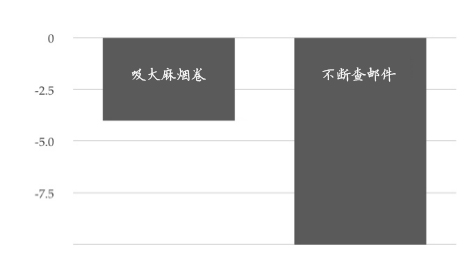
Figure 1 Corresponding IQ loss
This makes me wonder if companies should do less mandatory drug testing and more mandatory email habit testing. Of course, it’s not just email and drugs—drivers on cell phones can’t react quickly to road hazards. TV news channels bombard viewers with multiple reports: main screen, corner video windows, scrolling headlines, and disruptive ads. From a cognitive science perspective, this is pure torture for viewers.
Given how poorly we handle multiple tasks and how easily we’re distracted, let’s explore how to avoid common distractions and stay on task.
Avoiding Distractions
In a segment of NPR’s All Things Considered, Paul Ford praised the benefits of simple user interfaces. Recall early text-based word processors like WordStar or WordPerfect on CP/M or MS-DOS. No windows, no mouse, no email, no games. The environment was dull—but effective. Or rather, it helped you stay focused on your current work.
One of my favorite portable writing tools is my Sharp Zaurus. Near the end of its life, I stripped it down—only vi editor remained. I removed the wireless card and synced via CF card. The device became nearly distraction-free. In fact, it could only do one thing: write. No games, no email, no web—just your chapters and words. It was harsh but effective.
Active Switching
One helpful practice is to switch contexts more actively (note: actively). Instead of just ignoring an instant message or email, make it a deliberate act. Close your current work. Take a few deep breaths (we’ll discuss breathing and email techniques shortly). Approach the new activity with curiosity and full attention.
In more capable systems, you can run apps that hide all programs except the one you’re using. For example, on Mac, Think! hides everything outside the focused app, or DeskTopple, which hides desktop icons, replaces wallpaper, and auto-hides app windows on a timer.
Single-Task Interfaces
On Mac OS X, you can use QuickSilver to set up key-based shortcuts. It reminds me of SideKick, a terminate-and-stay-resident program from early systems.
For example, I customized it so a few keystrokes let me send a one-line email to someone in my address book. Seems minor—but the advantage of sending email without opening your inbox is huge.
Say you’re working and suddenly remember you need to email someone. Maybe you’re debugging and realize you’ll be late for lunch. You press a few keys, send the email, and return to debugging.
Now compare this to the usual experience.
You’re debugging and remember an email. You switch to your email client, open it, start composing—and see new messages in your inbox. Distraction hits. You’re drawn to the new emails and lose your debugging thread. Context is destroyed.
Similarly, I configured QuickSilver to add an item to my to-do list with a few keystrokes. Otherwise, you face the same risk: switching to your to-do list, seeing all other pending tasks, and getting distracted again.
You can do the same on Linux—open a small terminal window and use shell scripts to add to your to-do list.
When you have an idea, put it where it belongs—whether a to-do list or email—then return to what you were doing.
Effectively Organizing and Processing Tasks
Since we’re discussing how to regulate attention interfaces and work habits, we must talk about GTD.
David Allen’s Getting Things Done: The Art of Stress-Free Productivity [All02],简称GTD, is a hugely popular book/method/philosophy for organizing, prioritizing, and completing work effectively.
It offers a methodology and many practical tips (who knew labels could be so fascinating?) to help you work more efficiently.
From our perspective, Allen makes three key points. The first two relate to handling email or similar inboxes; the last is more general.
1. Process input queues only once Whatever your input queue—email inbox, voicemail, document inbox—don’t use the inbox as storage. Review and categorize incoming items, but don’t keep rechecking the same queue. If an item takes less than two minutes, handle it now—or delegate it entirely. Repeatedly reviewing the same 1,000 emails and doing the least important 20 wastes time and energy.
2. Work through each task group sequentially Once you start a task group, keep going—avoid context switching. As we’ve seen, switching tasks destroys your mental stack and costs more time when returning. Programmers are easily distracted by small things. Stick to what you’re doing.
3. Don’t keep lists in your head Allen highlights another key aspect: maintaining an external information processing system. Constantly refreshing mental to-do lists is costly. Instead, keep your to-do list externally—in sticky notes, a wiki, a calendar, a dedicated task tool, or similar.
GTD has many followers. If optimizing task prioritization and organization is your pain point, GTD could be very helpful.
Actively Managing Interruptions
Yet even the most organized to-do list and daily plan can’t prevent interruptions. Everyone gets interrupted—but today, we’re interrupted more than ever.
The web offers endless distractions: from daily spam to YouTube videos on snow machine DIY, election fraud debates, instant messages from close friends, new Wikipedia articles—everything competes for your attention.
Here are some suggestions to reduce distractions from your team, communication channels, and yourself.
Set Project Communication Rules
When is it appropriate to decline a colleague’s question, request for help debugging, or an impromptu code review? When can they interrupt you? What if your manager has an emergency?
These are valid questions. The best approach is to set answers before the project starts. Define uninterrupted work periods. Set other times for communication, daily stand-ups, and unexpected events.
No Perfect Days
Not every day is productive. If things get chaotic, accept it and realize you won’t be at your best. Handle urgent issues first, enjoy pizza in the office, and hope for a better tomorrow.
Maybe you’re sharpest in the morning or evening. At least, you’re most effective at certain times of day. I’ve heard of teams doing no-email afternoons or no-email days—no email, no calls, no interruptions. Developers call it their most productive and happiest time of the week.
So, establish interaction rules (really, interruption rules) for your team early in the project.
Slow Down Email
But not everyone follows rules. Your nearby colleagues might respect your boundaries—but what about those in remote offices? Others you deal with—people from other companies, clients, strangers on the other end of email, IM, or phone?
You can’t make the whole world run on your schedule.
Or can you?
Beware of Email-Induced Breath-Holding
In February 2008, Linda Stone coined the term email apnea. One morning, she opened her email—nothing unusual, just the usual flood of schedules, projects, trips, info, and spam. Then she noticed… she wasn’t breathing.
Email apnea: brief cessation or significant reduction of breathing while processing email.
Shallow breathing or breath-holding isn’t just uncomfortable—it can seriously harm your health if sustained. Poor breathing contributes to stress-related illnesses, triggers partial stress responses, blocks glucose from entering your blood, and has many other negative effects.
Does the anticipated stress from email affect your breathing? What about when a program crashes or during debugging? Or any other common computer situation?
If you notice this, pause each time and take a deep breath.
You have more control over your email than you think—based on how often you check and reply. Try this: limit email processing to specific, scheduled times each day—but maybe not first thing in the morning. Set a time to check and sort emails, and stick to it. Then move on to real work. This is hard discipline, but I have tricks to help.
First, disable email notifications. The icon is irresistible—it pulls you to click. So are the repetitive "You’ve got mail" sounds. Turn them all off if possible. At minimum, allow sound only for critical messages—like from family or your boss.
Second, increase the interval between email checks. Don’t check every minute, or sit like a lab rat clicking "Check Mail" for a food reward.
Next, manage expectations for reply speed and email volume. Remember the golden rule of email:
You set the pace of communication by how quickly you reply. The faster you reply, the higher others’ future expectations. Sending fewer, less frequent emails slows the frantic pace to a more reasonable level.
Finally, the best advice: out of sight, out of mind. Exit your email client when not in use.
Context-Friendly Breaks
You’ve been working hard, it’s getting harder, or you just need a break. You have options.
You can step away from the computer and doodle on blank paper. This is a low-level distraction. You can go for a walk—just don’t meet anyone or start talking, and walk aimlessly, staying context-friendly.
Or you can check headlines on CNN, Digg, or Slashdot. That’s a clear distraction. Worse, you can check email. Now I guarantee you’ve lost your train of thought. If you return to work today, it’ll take 20–30 minutes to recover—unproductive time.