Socket, Ports, and Processes Q&A (Collected and Organized)
1. How many ports does a computer have, what are they, and what are their purposes?
Ports are divided into three main categories:
-
Well-known Ports (0–1023): These are tightly bound to specific services. Communications on these ports typically indicate a specific protocol. For example, port 80 is always used for HTTP traffic.
-
Registered Ports (1024–49151): These are loosely associated with specific services. Many services use these ports, and they may also serve other purposes. For instance, systems often begin assigning dynamic ports around 1024.
-
Dynamic and/or Private Ports (49152–65535): These should theoretically not be assigned to services. In practice, most systems assign dynamic ports starting from 1024, though exceptions exist—such as SUN's RPC ports, which start from 32768.
----------------------------------------------------------------------------------------------------------------------------------
2. A computer has only one IP address but multiple distinct ports
-
An IP address identifies a host; identical IP addresses usually indicate the same machine.
A port identifies a process. Two processes on the same machine cannot occupy the same port simultaneously, so if ports differ, they may belong to different processes on the same host. -
Ports used for direct internet access typically start from 4000.
-
If two QQ instances are running on the same machine, their ports are usually 4000 and 4001, respectively.
--------------------------------------------------------------------------
3. Processes and Ports
- Port Definition
-
Ports
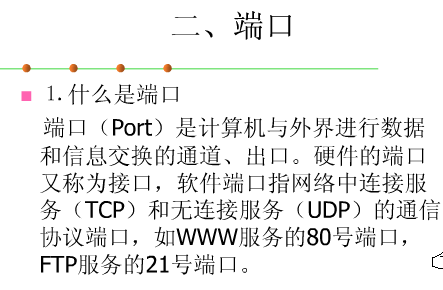
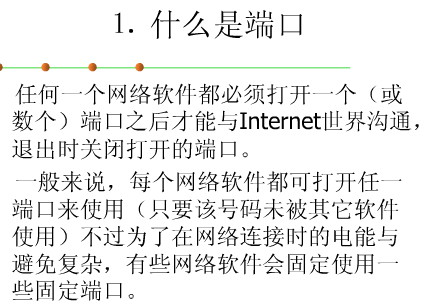
A port is a named and addressable communication endpoint in a network, representing a resource that the operating system can allocate.
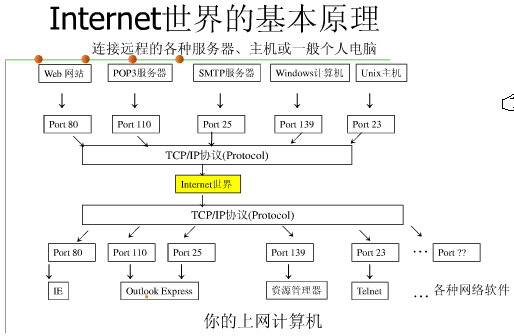
According to the OSI seven-layer model, the key functional difference between the transport layer and the network layer is that the transport layer provides process-to-process communication. Thus, the final destination in network communication is not just a host address, but also includes an identifier for a specific process. To address this, the TCP/IP protocol suite introduces the concept of a protocol port (commonly referred to as a "port") to identify communicating processes.
A port is an abstract software structure (including data structures and I/O buffers). After an application (i.e., a process) establishes a connection (binding) to a port via a system call, all data delivered by the transport layer to that port is received by the corresponding process, and all data sent by the process to the transport layer is transmitted through that port. In TCP/IP implementations, port operations resemble standard I/O operations—acquiring a port is akin to obtaining a unique local I/O file, which can be accessed using standard read/write primitives.
Similar to file descriptors, each port has an integer identifier called a port number to distinguish it from others. Since the TCP and UDP protocols in the TCP/IP transport layer are independent modules, their port number spaces are separate. For example, TCP can have port 255, and UDP can simultaneously have port 255 without conflict.
Port number allocation is critical and follows two basic methods:
- Global allocation: A centralized approach where a recognized central authority assigns ports based on user needs and publishes the assignments.
- Local allocation (dynamic allocation): A process requests a port from the local operating system, which returns a locally unique port number. The process then binds itself to this port via a system call.
TCP/IP combines both methods. It divides port numbers into two ranges: a small set of well-known ports assigned globally to standard services. Thus, every standard server has a universally recognized port number (e.g., port 80 for HTTP), consistent across machines. The remaining ephemeral ports are allocated locally. Both TCP and UDP reserve port numbers below 256 for well-known services.
Addressing
In network communication, the two communicating processes reside on different machines. In an interconnected network, machines may belong to different subnets, connected via network devices (gateways, bridges, routers, etc.). Hence, a three-level addressing scheme is required:
- A host may connect to multiple networks, so a specific network address must be specified.
- Each host on the network must have a unique address.
- Each process on a host must have a unique identifier within that host.
Typically, a host address consists of a network ID and a host ID, represented as a 32-bit integer in TCP/IP. Both TCP and UDP use 16-bit port numbers to identify user processes.
Network Byte Order
Different computers store multi-byte values in different orders—some store the least significant byte at the lowest address (little-endian), others the most significant byte (big-endian). To ensure data integrity, network protocols define a standard byte order. TCP/IP uses big-endian (most significant byte first) for 16-bit and 32-bit integers, as defined in protocol header files.
Connection
The communication link between two processes is called a connection. Internally, a connection consists of buffers and protocol mechanisms; externally, it provides higher reliability than connectionless communication.
Half-association
As discussed, a process can be uniquely identified globally by a triple:
(Protocol, Local Address, Local Port Number)
This triple is known as a half-association, specifying one half of a connection.
Full Association
A complete inter-process communication requires two processes using the same high-level protocol—e.g., both ends must use TCP or both UDP. Therefore, a full communication is identified by a quintuple:
(Protocol, Local Address, Local Port, Remote Address, Remote Port)
This quintuple is called an association. Only two half-associations using the same protocol can form a valid association, fully specifying a connection.
------------------------------------------------------------------------------------------------
4. Revisiting Process-to-Port Mapping
Creation Date: 2002-02-05
Article Type: Original
Source: www.whitecell.org
Submitted by: ILSY (masteruser_at_263.net)
Author : ilsy
Email : ilsy@whitecell.org
HomePage: http://www.whitecell.org
Date : 2002-02-06
Category: Security
Keywords: process, PDE, PTE, paging, kernel object, linear address, physical address
There are many articles on process-to-port mapping. Here, I present my analysis of fport, explaining how it works.
fport.exe is a free tool developed by the Foundstone team that lists all open ports on a system and identifies which processes opened them.
The method described below is based on fport v1.33. If your version differs, please verify the version.
First, the tool checks whether the current user has administrative privileges (by reading the current process token). If not, it displays a warning and exits. Then, it adjusts the current process token. Next, it uses the ZwOpenSection function to open the kernel object \\Device\\PhysicalMemory, which allows access to physical system memory. The function prototype is as follows:
NTSYSAPI
NTSTATUS
NTAPI
ZwOpenSection(
OUT PHANDLE SectionHandle;
IN ACCESS_MASK DesiredAccess;
IN POBJECT_ATTRIBUTES ObjectAttributes
);
(See ntddk.h)
The first parameter receives the handle upon successful execution.
The second parameter, DesiredAccess, can be one of the following constants:
#define SECTION_QUERY 0x0001
#define SECTION_MAP_WRITE 0x0002
#define SECTION_MAP_READ 0x0004
#define SECTION_MAP_EXECUTE 0x0008
#define SECTION_EXTEND_SIZE 0x0010
#define SECTION_ALL_ACCESS (STANDARD_RIGHTS_REQUIRED|SECTION_QUERY|\\
                        SECTION_MAP_WRITE |      \\
                        SECTION_MAP_READ |       \\
                        SECTION_MAP_EXECUTE |    \\
                        SECTION_EXTEND_SIZE)
(See ntddk.h)
The third parameter is a structure containing information such as the object type to open:
typedef struct _OBJECT_ATTRIBUTES {
ULONG Length;
HANDLE RootDirectory;
PUNICODE_STRING ObjectName;
ULONG Attributes;
PVOID SecurityDescriptor; // Points to type SECURITY_DESCRIPTOR
PVOID SecurityQualityOfService; // Points to type SECURITY_QUALITY_OF_SERVICE
} OBJECT_ATTRIBUTES;
typedef OBJECT_ATTRIBUTES *POBJECT_ATTRIBUTES;
(See ntdef.h)
This structure is initialized using a macro:
#define InitializeObjectAttributes( p, n, a, r, s ) { \
(p)->Length = sizeof( OBJECT_ATTRIBUTES ); \
(p)->RootDirectory = r; \
(p)->Attributes = a; \
(p)->ObjectName = n; \
(p)->SecurityDescriptor = s; \
(p)->SecurityQualityOfService = NULL; \
}
(See ntdef.h)
To open the kernel object \\Device\\PhysicalMemory, the code is:
WCHAR PhysmemName[] = L"\\Device\\PhysicalMemory";
void * pMapPhysicalMemory;
HANDLE pHandle;
bool OpenPhysicalMemory()
{
NTSTATUS status;
UNICODE_STRING physmemString;
OBJECT_ATTRIBUTES attributes;
RtlInitUnicodeString( &physmemString, PhysmemName ); // Initialize Unicode string, see ntddk.h
InitializeObjectAttributes( &attributes, &physmemString,
OBJ_CASE_INSENSITIVE, NULL, NULL ); // Initialize OBJECT_ATTRIBUTES
status = ZwOpenSection(pHandle, SECTION_MAP_READ, &attributes ); // Open \Device\PhysicalMemory, get handle
if( !NT_SUCCESS( status ))
return false;
pMapPhysicalMemory = MapViewOfFile(pHandle, FILE_MAP_READ,
0, 0x30000, 0x1000);
// Map 0x1000 bytes starting from physical address 0x30000
if( GetLastError() != 0 )
return false;
return true;
}
Why start mapping from 0x30000? In Windows NT/2000, the system is divided into kernel mode (Ring 0) and user mode (Ring 3). All visible processes run in Ring 3. The physical address of the System process's Page Directory Entry (PDE) is typically 0x30000—the smallest PDE address in the system. The PDE contains 1024 entries, each pointing to a Page Table Entry (PTE). Each PTE manages 1024 pages of 4KB each. Since 1024 × 4KB = 0x1000 bytes, mapping 0x1000 bytes from 0x30000 covers one full PDE. (See WebCrazy's article "On Windows NT/2000 Paging Mechanism" for details.)
After opening \\Device\\PhysicalMemory, the program uses ZwOpenFile to open the kernel objects \\Device\\Tcp and \\Device\\Udp. The function prototype is:
NTSYSAPI
NTSTATUS
NTAPI
ZwOpenFile(
OUT PHANDLE FileHandle,
IN ACCESS_MASK DesiredAccess,
IN POBJECT_ATTRIBUTES ObjectAttributes,
OUT PIO_STATUS_BLOCK IoStatusBlock,
IN ULONG ShareAccess,
IN ULONG OpenOptions
);
(See ntddk.h)
The first parameter returns the handle to the opened object.
The second parameter, DesiredAccess, can be:
#define FILE_READ_DATA ( 0x0001 ) // file & pipe
#define FILE_LIST_DIRECTORY ( 0x0001 ) // directory
#define FILE_WRITE_DATA ( 0x0002 ) // file & pipe
#define FILE_ADD_FILE ( 0x0002 ) // directory
#define FILE_APPEND_DATA ( 0x0004 ) // file
#define FILE_ADD_SUBDIRECTORY ( 0x0004 ) // directory
#define FILE_CREATE_PIPE_INSTANCE ( 0x0004 ) // named pipe
#define FILE_READ_EA ( 0x0008 ) // file & directory
#define FILE_WRITE_EA ( 0x0010 ) // file & directory
#define FILE_EXECUTE ( 0x0020 ) // file
#define FILE_TRAVERSE ( 0x0020 ) // directory
#define FILE_DELETE_CHILD ( 0x0040 ) // directory
#define FILE_READ_ATTRIBUTES ( 0x0080 ) // all
#define FILE_WRITE_ATTRIBUTES ( 0x0100 ) // all
#define FILE_ALL_ACCESS (STANDARD_RIGHTS_REQUIRED | SYNCHRONIZE | 0x1FF)
#define FILE_GENERIC_READ (STANDARD_RIGHTS_READ |\
FILE_READ_DATA |\
FILE_READ_ATTRIBUTES |\
FILE_READ_EA |\
SYNCHRONIZE)
#define FILE_GENERIC_WRITE (STANDARD_RIGHTS_WRITE |\
FILE_WRITE_DATA |\
FILE_WRITE_ATTRIBUTES |\
FILE_WRITE_EA |\
FILE_APPEND_DATA |\
SYNCHRONIZE)
#define FILE_GENERIC_EXECUTE (STANDARD_RIGHTS_EXECUTE |\
FILE_READ_ATTRIBUTES |\
FILE_EXECUTE |\
SYNCHRONIZE)
(See ntdef.h)
The third parameter is the same structure as above.
The fourth parameter returns object attributes in an IO_STATUS_BLOCK structure:
typedef struct _IO_STATUS_BLOCK {
union {
NTSTATUS Status;
PVOID Pointer;
};
ULONG_PTR Information;
} IO_STATUS_BLOCK, *PIO_STATUS_BLOCK;
#if defined(_WIN64)
typedef struct _IO_STATUS_BLOCK32 {
NTSTATUS Status;
ULONG Information;
} IO_STATUS_BLOCK32, *PIO_STATUS_BLOCK32;
#endif
(See ntddk.h)
The fifth parameter, ShareAccess, can be:
#define FILE_SHARE_READ 0x00000001 // winnt
#define FILE_SHARE_WRITE 0x00000002 // winnt
#define FILE_SHARE_DELETE 0x00000004 // winnt
(See ntddk.h)
The sixth parameter, OpenOptions, can be:
#define FILE_DIRECTORY_FILE 0x00000001
#define FILE_WRITE_THROUGH 0x00000002
#define FILE_SEQUENTIAL_ONLY 0x00000004
#define FILE_NO_INTERMEDIATE_BUFFERING 0x00000008
#define FILE_SYNCHRONOUS_IO_ALERT 0x00000010
#define FILE_SYNCHRONOUS_IO_NONALERT 0x00000020
#define FILE_NON_DIRECTORY_FILE 0x00000040
#define FILE_CREATE_TREE_CONNECTION 0x00000080
#define FILE_COMPLETE_IF_OPLOCKED 0x00000100
#define FILE_NO_EA_KNOWLEDGE 0x00000200
#define FILE_OPEN_FOR_RECOVERY 0x00000400
#define FILE_RANDOM_ACCESS 0x00000800
#define FILE_DELETE_ON_CLOSE 0x00001000
#define FILE_OPEN_BY_FILE_ID 0x00002000
#define FILE_OPEN_FOR_BACKUP_INTENT 0x00004000
#define FILE_NO_COMPRESSION 0x00008000
#define FILE_RESERVE_OPFILTER 0x00100000
#define FILE_OPEN_REPARSE_POINT 0x00200000
#define FILE_OPEN_NO_RECALL 0x00400000
#define FILE_OPEN_FOR_FREE_SPACE_QUERY 0x00800000
#define FILE_COPY_STRUCTURED_STORAGE 0x00000041
#define FILE_STRUCTURED_STORAGE 0x00000441
#define FILE_VALID_OPTION_FLAGS 0x00ffffff
#define FILE_VALID_PIPE_OPTION_FLAGS 0x00000032
#define FILE_VALID_MAILSLOT_OPTION_FLAGS 0x00000032
#define FILE_VALID_SET_FLAGS 0x00000036
(See ntddk.h)
To open \\Device\\Tcp and \\Device\\Udp:
WCHAR physmemNameTcp[] = L"\\Device\\TCP";
WCHAR physmemNameUdp[] = L"\\Device\\UDP";
HANDLE pTcpHandle;
HANDLE pUdpHandle;
HANDLE OpenDeviceTcpUdp(WCHAR * deviceName)
{
NTSTATUS status;
UNICODE_STRING physmemString;
OBJECT_ATTRIBUTES attributes;
IO_STATUS_BLOCK iosb;
HANDLE pDeviceHandle;
RtlInitUnicodeString(&physmemString, deviceName);
if(GetLastError() != 0)
return NULL;
InitializeObjectAttributes( &attributes, &physmemString,
OBJ_CASE_INSENSITIVE, 0, NULL );
status = ZwOpenFile( &pDeviceHandle, 0x100000, &attributes, &iosb, 3, 0 );
if( !NT_SUCCESS( status ))
return NULL;
}
Next, the program uses ZwQuerySystemInformation to retrieve all handles and related information for currently running processes. The function prototype is:
NTSYSAPI
NTSTATUS
NTAPI
ZwQuerySystemInformation(
IN SYSTEM_INFORMATION_CLASS SystemInformationClass,
IN OUT PVOID SystemInformation,
IN ULONG SystemInformationLength,
OUT PULONG ReturnLength OPTIONAL
);
(This function structure is not publicly documented by Microsoft; see Gary Nebbett's "Windows NT/2000 Native API Reference".)
The first parameter is an enumeration specifying the system information type. ZwQuerySystemInformation supports 54 types; we use type 16, SystemHandleInformation.
The SYSTEM_HANDLE_INFORMATION structure is defined as:
typedef struct _SYSTEM_HANDLE_INFORMATION {
ULONG ProcessID; // Process identifier
UCHAR ObjectTypeNumber; // Object type
UCHAR Flags; // 0x01 = PROTECT_FROM_CLOSE, 0x02 = INHERIT
USHORT Handle; // Handle value
PVOID Object; // Kernel object address pointed to by handle
ACCESS_MASK GrantedAccess; // Access rights granted when handle was created
} SYSTEM_HANDLE_INFORMATION, *PSYSTEM_HANDLE_INFORMATION;
(Not publicly documented; see Nebbett's book.)
The second parameter outputs the query result.
The third sets the buffer size.
The fourth returns the required buffer size if the call fails due to insufficient buffer.
Code:
#define SystemHandleInformation 16
PULONG GetHandleList()
{
ULONG cbBuffer = 0x1000;
PULONG pBuffer = new ULONG[cbBuffer];
NTSTATUS Status;
do {
Status = ZwQuerySystemInformation(
SystemHandleInformation,
pBuffer, cbBuffer * sizeof * pBuffer, NULL);
if (Status == STATUS_INFO_LENGTH_MISMATCH) {
delete [] pBuffer;
pBuffer = new ULONG[cbBuffer *= 2];
}
else if (!NT_SUCCESS(Status)) {
delete [] pBuffer;
return NULL;
}
} while (Status == STATUS_INFO_LENGTH_MISMATCH);
return pBuffer;
}
If a process opens a port, it must have created kernel objects of type \\Device\\Tcp or \\Device\\Udp. By opening these objects ourselves and saving their handles, we can search the handle list for entries matching our saved handles, then retrieve the corresponding kernel object addresses. Code:
DWORD TcpHandle;
DWORD UdpHandle;
DWORD GetTcpUdpObject(PULONG pBuffer, HANDLE pHandle, DWORD ProcessId)
{
DWORD objTYPE1, objTYPE2, HandleObject;
PSYSTEM_HANDLE_INFORMATION pProcesses = (PSYSTEM_HANDLE_INFORMATION)(pBuffer + 1);
for (i = 0; i < *pBuffer; i++) {
if ((pProcesses[i].ProcessID) == ProcessId) {
objTYPE1 = (DWORD)hDeviceTcpUdp;
objTYPE2 = (DWORD)pProcesses[i].Handle;
if (objTYPE1 == objTYPE2) {
HandleObject = (DWORD)pProcesses[i].Object;
return HandleObject;
}
}
}
return 0;
}
This kernel object address is a linear (virtual) address. We must convert it to a physical address and extract relevant data. In fport, the conversion is done as follows:
(See WebCrazy's article for details.)
void * NewmapPhy;
void GetPTE(DWORD objAddress)
{
DWORD physmemBuff;
DWORD newAddress1, newAddress2, newAddress3, newAddress4;
DWORD * newAddress;
physmemBuff = (DWORD)pMapPhysicalMemory;
newAddress1 = physmemBuff + (objAddress >> 0x16) * 4;
newAddress = (DWORD *)newAddress1;
newAddress1 = *newAddress;
newAddress2 = objAddress & 0x3FF000;
newAddress3 = newAddress1 & 0x0FFFFF000;
newAddress4 = newAddress2 + newAddress3;
NewmapPhy = MapViewOfFile(ghPhysicalMemory, FILE_MAP_READ, 0, newAddress4, 0x1000);
}
Next, we retrieve the physical page corresponding to the linear address and access the page containing the kernel object data. The PTE structure is:
typedef struct {
ULONG Present;
ULONG WriteTable;
ULONG User;
ULONG WriteThru;
ULONG NoCache;
ULONG Accessed;
ULONG Dirty;
ULONG PageSize;
ULONG Global;
ULONG Available;
ULONG Pfn;
} PTE, *PPTE;
(Note: This structure may not be fully accurate, but it suffices for our purposes.)
Code:
ULONG CurrWriteTable;
ULONG CurrNoCache;
void GetMustPar(DWORD objAddress)
{
DWORD CurrAddress = objAddress & 0xFFF;
PPTE pte = (PPTE)((DWORD)NewmapPhy + CurrAddress);
CurrWriteTable = pte->WriteTable;
CurrNoCache = pte->NoCache;
}
Now we have all necessary data. The next step is to iterate through all processes and their handles. (Note: Not all handles—on Windows NT, \\Device\\Tcp and \\Device\\Udp have object type 0x16; on Windows 2000, it's 0x1A.) For each such handle, we use the above method to retrieve its PTE and WriteTable value. If it matches that of \\Device\\Tcp or \\Device\\Udp, the handle likely represents an open port. We then confirm it. Confirmation code:
typedef struct _TDI_CONNECTION_INFO {
ULONG State;
ULONG Event;
ULONG TransmittedTsdus;
ULONG ReceivedTsdus;
ULONG TransmissionErrors;
ULONG ReceiveErrors;
LARGE_INTEGER Throughput;
LARGE_INTEGER Delay;
ULONG SendBufferSize;
ULONG ReceiveBufferSize;
BOOLEAN Unreliable;
} TDI_CONNECTION_INFO, *PTDI_CONNECTION_INFO;
typedef struct _TDI_CONNECTION_INFORMATION {
LONG UserDataLength;
PVOID UserData;
LONG OptionsLength;
PVOID Options;
LONG RemoteAddressLength;
PVOID RemoteAddress;
} TDI_CONNECTION_INFORMATION, *PTDI_CONNECTION_INFORMATION;
(See tdi.h)
void GetOpenPort(DWORD dwProcessesID, USHORT Handle, int NoCache)
// dwProcessesID: Process ID
// Handle: Handle of type \Device\Tcp or \Device\Udp
// NoCache: Value from PTE structure
{
HANDLE hProc, DupHandle = NULL;
HANDLE hEven = NULL;
OVERLAPPED overlap;
u_short openport;
int i = 0;
char procName[256] = {0};
int portflag = 0;
overlap.Internal = 0;
overlap.InternalHigh = 0;
overlap.Offset = 0;
overlap.OffsetHigh = 0;
hEven = CreateEvent(0, 1, 0, 0);
overlap.hEvent = hEven;
hProc = OpenProcess(PROCESS_DUP_HANDLE, 0, dwProcessesID);
if (hProc) {
DuplicateHandle(hProc, (HANDLE)Handle, GetCurrentProcess(), &DupHandle, 0, FALSE, 2);
CloseHandle(hProc);
if (DupHandle) {
TDI_CONNECTION_INFO TdiConnInfo = {0};
TDI_CONNECTION_INFORMATION TdiConnInformation = {0};
DWORD dwRetu = 0;
if (NoCache == 0x2) {
TdiConnInformation.RemoteAddressLength = 4;
if (DeviceIoControl(DupHandle, 0x210012,
&TdiConnInformation, sizeof(TdiConnInformation),
&TdiConnInfo, sizeof(TdiConnInfo), 0, &overlap)) {
openport = ntohs((u_short)TdiConnInfo.ReceivedTsdus);
procName = GetProcName(dwProcessesID);
printf("PID = %4d ProcessName = %15s PORT = %4d\n", dwProcessesID, procName, openport);
}
}
if (NoCache == 0x1) {
TdiConnInformation.RemoteAddressLength = 3;
if (DeviceIoControl(DupHandle, 0x210012,
&TdiConnInformation, sizeof(TdiConnInformation),
&TdiConnInfo, sizeof(TdiConnInfo), 0, &overlap)) {
openport = ntohs((u_short)TdiConnInfo.ReceivedTsdus);
procName = GetProcName(dwProcessesID);
printf("PID = %4d ProcessName = %15s PORT = %4d\n", dwProcessesID, procName, openport);
}
}
}
}
CloseHandle(hEven);
CloseHandle(DupHandle);
}
The above is my analysis and implementation code for fport.exe. The demo program is available for download from whitecell.org. If you find any issues, please let me know. ^_^
References:
- fport.exe
- Gary Nebbett, Windows NT/2000 Native API Reference
- WebCrazy, On Windows NT/2000 Paging Mechanism
- NTDDK
About Us:
WSS (Whitecell Security Systems) is a non-profit, grassroots technical organization dedicated to research in system security. We uphold traditional hacker ethics and strive for technical excellence.
WSS Homepage: http://www.whitecell.org/
WSS Forum: http://www.whitecell.org/forum/