Solution for win7 VMware ifconfig showing only IPv6, and Samba
#VMware#Interface#Windows#Up#Terminal#C
In win7 VMware, if ifconfig only shows IPv6 and no IPv4 like in an XP environment, how do you use Samba? Or how do you share files with Windows? Here's a solution.
Problem 1: Only IPv6
[root@localhost ~]# ifconfigeth0 Link encap:Ethernet HWaddr 00:0C:29:E1:98:55 inet6 addr: 2001:250:3000:5a06:20c:29ff:fee1:9855/64 Scope:Global inet6 addr: fe80::20c:29ff:fee1:9855/64 Scope:Link UP BROADCAST RUNNING MULTICAST MTU:1500 Metric:1 RX packets:412806 errors:5 dropped:38 overruns:0 frame:0 TX packets:38 errors:0 dropped:0 overruns:0 carrier:0 collisions:0 txqueuelen:1000 RX bytes:41496217 (39.5 MiB) TX bytes:7915 (7.7 KiB) Interrupt:193 Base address:0x2000 lo Link encap:Local Loopback inet addr:127.0.0.1 Mask:255.0.0.0 inet6 addr: ::1/128 Scope:Host UP LOOPBACK RUNNING MTU:16436 Metric:1 RX packets:3217 errors:0 dropped:0 overruns:0 frame:0 TX packets:3217 errors:0 dropped:0 overruns:0 carrier:0 collisions:0 txqueuelen:0 RX bytes:4593565 (4.3 MiB) TX bytes:4593565 (4.3 MiB)
Solution:
Step 1: Change the network connection type from Bridged to NAT.
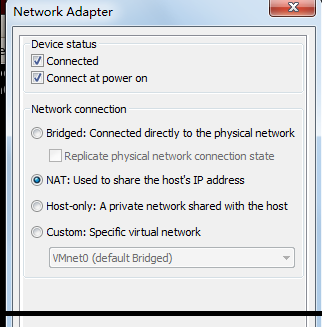
Step 2: Run in the terminal
/etc/init.d/network restart
[root@localhost ~]# /etc/init.d/network restartShutting down interface eth0: [ OK ]Shutting down loopback interface: [ OK ]Bringing up loopback interface: [ OK ]Bringing up interface eth0: Determining IP information for eth0... done. [ OK ]
Step 3: Run ifconfig
[root@localhost ~]# ifconfigeth0 Link encap:Ethernet HWaddr 00:0C:29:E1:98:55 inet addr:192.168.119.129 Bcast:192.168.119.255 Mask:255.255.255.0 inet6 addr: fe80::20c:29ff:fee1:9855/64 Scope:Link UP BROADCAST RUNNING MULTICAST MTU:1500 Metric:1 RX packets:412815 errors:5 dropped:0 overruns:0 frame:0 TX packets:68 errors:0 dropped:0 overruns:0 carrier:0 collisions:0 txqueuelen:1000 RX bytes:41497420 (39.5 MiB) TX bytes:16351 (15.9 KiB) Interrupt:193 Base address:0x2000 lo Link encap:Local Loopback inet addr:127.0.0.1 Mask:255.0.0.0 inet6 addr: ::1/128 Scope:Host UP LOOPBACK RUNNING MTU:16436 Metric:1 RX packets:3217 errors:0 dropped:0 overruns:0 frame:0 TX packets:3217 errors:0 dropped:0 overruns:0 carrier:0 collisions:0 txqueuelen:0 RX bytes:4593565 (4.3 MiB) TX bytes:4593565 (4.3 MiB)
Success!
II. Share folders with Windows
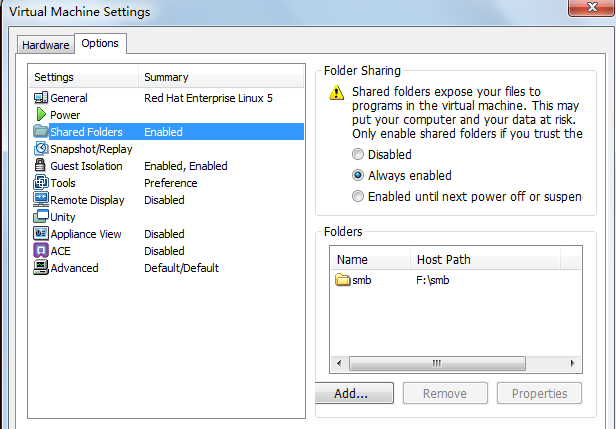
Haha, special thanks to Hanbin for the detailed guidance!