Adding a Chinese Character Font Library (Part 2) — Methods for Storing and Extracting Chinese Character Patterns
A Chinese character library is like a Xinhua Dictionary!
I. Introduction
After spending an entire day of precious time, I finally found the root cause: the dot-matrix extraction settings in the Chinese character generation software were incorrect, resulting in garbled or distorted display output. As shown in the figure below:
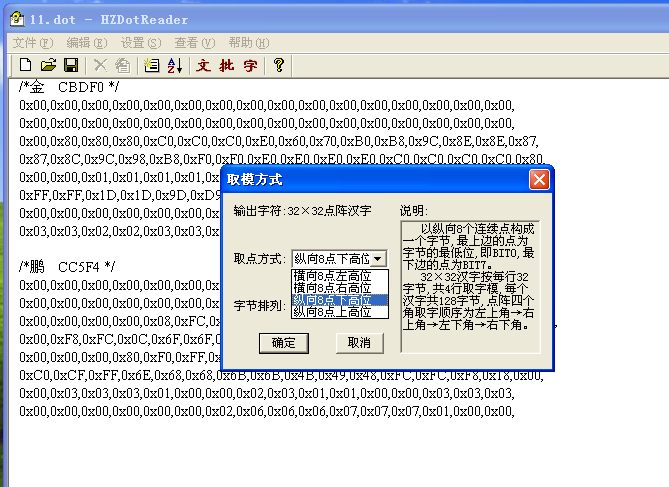
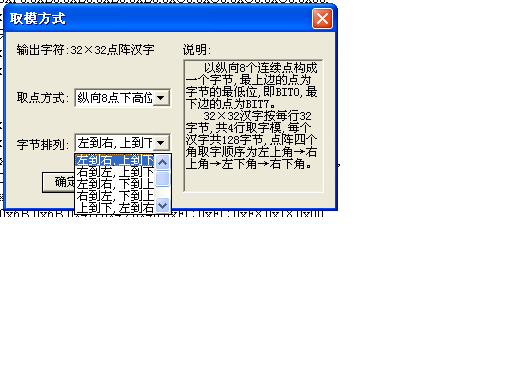
By habit, I had selected "horizontal extraction with MSB on the left" in the software. Upon closer inspection, however, I realized my code actually uses "vertical extraction with MSB at the bottom."
I initially suspected the extraction mode might be wrong, but convinced myself that even if it were inverted, it would only result in a mirrored or upside-down font—nothing critical. Now I realize how wrong that assumption was. (Use your imagination.)
Below is the relevant portion of my code for pattern display. Sharing it here for reference:
DWORD LCDdisplay3232(BYTE locax,BYTE locay,BYTE *pdata)   // Display 32*32 dot matrix
{
    int i,j;
    unsigned long rslt;
    for(i=0;i<128;i++)                                   // 32*32/8 = 128
    {
        for(j=0;j<8;j++)                         // Since one byte contains 8 bits
        {
            Xadd(locax+(i%32),locax+(i%32));
            if(i<32)                             // These 8 lines define the extraction mode. Clearly, I use vertical extraction with MSB at the bottom. (i is horizontal axis, j is vertical axis)
                Yadd(locay*8+j,locay*8+j);
            else if((i>=32)&&(i<64))
                Yadd(locay*8+8+j,locay*8+8+j);
            else if((i>=64)&&(i<96))
                Yadd(locay*8+16+j,locay*8+16+j);
            else if((i>=96)&&(i<128))
                Yadd(locay*8+24+j,locay*8+24+j);
            if(pdata[i] & (1<<j))
            {
                if(ucDefualtFColorSet ==0)
                {
                    LCDCOM_MASTER(0x2C);
                    LCDDATA_MASTER(ucFrontColorSet1);
                    LCDDATA_MASTER(ucFrontColorSet2);
                }
                else
                {
                    continue;
                }
            }
            else
            {
                if(ucDefualtBColorSet ==0)
                {
                    LCDCOM_MASTER(0x2C);
                    LCDDATA_MASTER(ucBackColorSet1);
                    LCDDATA_MASTER(ucBackColorSet2);
                }
                else
                {
                    continue;
                }
            }
        }
    }

    if(locax+32>120)
    {
        locay = locay + 4;
        locax = 0;
    }
    else
    {
        locax = locax + 32;
    }

    rslt = ((locax)<<8) + locay;
    return rslt;
}
- This Chinese character library is driving me crazy. Is it really that hard to display just two characters like "金鹏"? Is creating and displaying a custom font library really so difficult?
Where exactly did I go wrong?
2. Can Chinese characters be searched automatically? How are auto-offset and positioning implemented?
Is the glyph itself inherently tied to a specific zone-position code? Is there a one-to-one mapping so that when I write a Chinese character, its glyph automatically corresponds to an entry in the font library? But there must be a program to handle this mapping, right?
Answer: Since each zone-position code corresponds to one unique Chinese character, each character also maps to one unique zone-position code.
[Extension 1]: When we type Chinese characters, are we using zone-position code input method? If so, what's the relationship and difference between Wubi, Pinyin, and zone-position input methods?
-
Reference 1: "Method for Displaying Chinese Characters on LCD"
-
Reference 2: ""
-
Building an Incomplete Chinese Character Library
http://blog.csdn.net/pmind/article/details/6078166
- Despite all this discussion, I still haven't made any real progress. What should I do? Where is the error?
Now I need to calmly and thoroughly understand the entire program.
Alternatively, I should write a test case from scratch.
-
The issue likely lies in array indexing. I should try alternative approaches.
-
Another question: Is my understanding correct? Are the underlying functions implemented correctly?
==============================================================================================
II. Terminology Introduction
1. Chinese Character Pattern Code
To display Chinese character shapes, Chinese information processing systems require a Chinese character pattern library (also called a glyph library), which stores all character shape data. When displaying a character, the system retrieves the corresponding glyph data from the pattern library using the internal character code, then outputs it to the display device.
A Chinese character pattern is represented by a grid of 0s and 1s. The character is placed within an n×n square grid, where each cell corresponds to one bit: 1 if the stroke passes through, 0 otherwise.
Common Chinese dot matrix patterns include 16×16, 24×24, 32×32, and 48×48 dot matrices, requiring 32, 72, 128, and 288 bytes per character respectively. The higher the resolution, the more aesthetically pleasing the displayed character.
A pattern library stored on disk is called a soft font library; one stored in ROM on a printed circuit board is called a hard font library, also known as a "Han card."
2. Zone-Position Code
The GB code (Guojia Biaozhun, national standard) is a four-digit hexadecimal number, while the zone-position code is a four-digit decimal number. Each GB code or zone-position code uniquely represents a Chinese character or symbol. However, since hexadecimal is rarely used directly, the zone-position code is more commonly used. Its first two digits are the "zone code," and the last two are the "position code."
Distribution of Chinese character sets:
- Level 1 characters: Zones 16–55
- Level 2 characters: Zones 56–87
- Level 3 characters: Zones 1–9
- Unused/reserved: Zones 10–15
http://www.hudong.com/wiki/%E5%8C%BA%E4%BD%8D%E7%A0%81
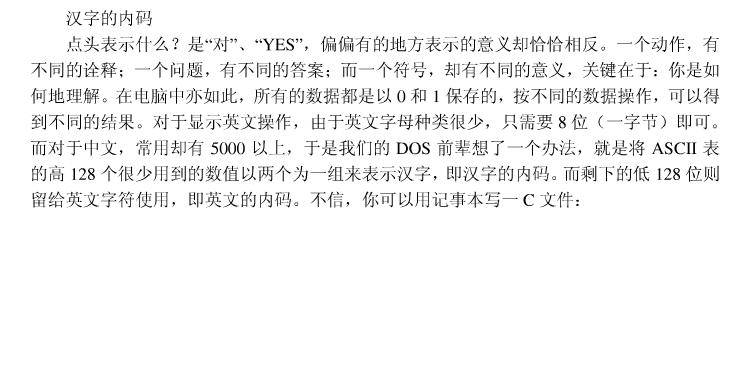
3. Internal Code (Internal Character Code)
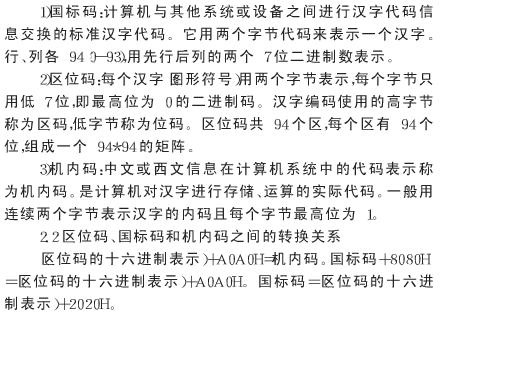
4. Relationship Among Internal Code, Zone-Position Code, GB Code, and Their Conversions
5. Differences and Relationships Between Zone-Position Input Method, Pinyin Input Method, etc. Is Pinyin Input Based on Zone-Position Code?
Pinyin input method is based on Mandarin phonetics and uses standard Latin keyboard letters to input Chinese characters. The most commonly used variants in China are Full Pinyin and Double Pinyin. Zone-position input method uses the zone-position code for character input, also known as internal code input. The zone-position code is a four-digit decimal number, a sequential code that does not follow phonetic or structural ordering. Each code corresponds uniquely to one character or symbol. For example, the character "宝" has the zone-position code 1706; typing 1706 inputs the character "宝". These numbers directly correspond to the character's zone and position in the standard table.
In short, zone-position input has no homonyms (each code maps uniquely), while Pinyin input has homonyms—each phonetic combination maps to a list of possible characters.
Zone-position input replaces letters with numbers and is typically used for direct code-based typing.
http://www.cnblogs.com/xilentz/archive/2010/06/10/1755598.html (Contains Pinyin input method source code)
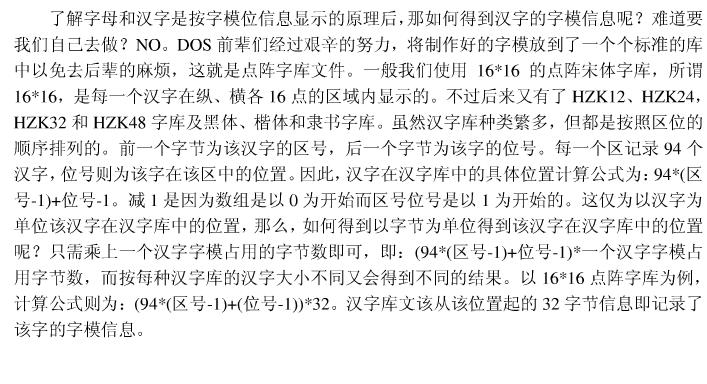
6. Methods for Extracting Chinese Character Libraries (Calculation Formulas)
V. Reflections
1. Be smarter. If something can be figured out in your mind, don't waste time writing it down.