Error When Booting File System: Warning: unable to open an initial console
————————————————————————————————
(1) Error occurs when booting the file system: Warning: unable to open an initial console.
————————————————————————————————
Specific error:
yaffs: dev is 32505858 name is "mtdblock2"yaffs: passed flags ""yaffs: Attempting MTD mount on 31.2, "mtdblock2"yaffs: auto selecting yaffs2s3c-nand: ECC uncorrectable error detectedblock 109 is badVFS: Mounted root (yaffs filesystem).Freeing init memory: 140KWarning: unable to open an initial console.
Root cause investigation:
- The /dev/console and /dev/null files in the downloaded file system were deleted.
Recreate them using:
mknod –m 660 console c 5 1
mknod –m 660 null c 1 3
-
Ensure that /dev/console exists on your root file system.
-
Are you sure your rootfs is actually cramfs? If it's jffs2, try adding rootfstype=jffs2 to the kernel command line.
-
After enabling devfs support in the kernel configuration, the warning "unable to open an initial console" disappeared, and the message "Mounted devfs on /dev" appeared during boot. However, that was all — no further output. Keyboard input resulted in garbled characters!
************
Final Root Cause:
************
Some steps were skipped when creating the root file system directory structure.
Enter opt/mini2440/fs and create a shell script to build the necessary directories for the root file system: create_rootfs_bash, then change its execution permissions.
#chmod +x create_rootfs_bash
Run ./create_rootfs_bash from the kernel directory. The script content is as follows:
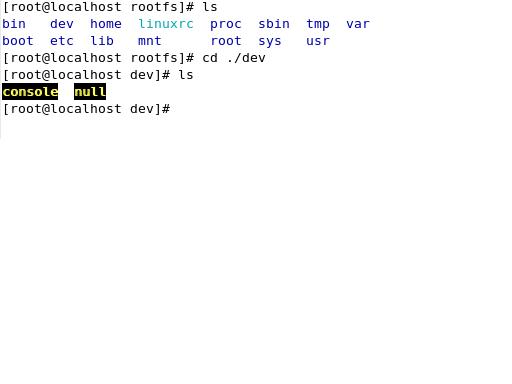
#!/bin/shecho "------Create rootfs directories start...--------"mkdir rootfscd rootfsecho "--------Create root,dev....----------"mkdir root dev etc boot tmp var sys proc lib mnt home usrmkdir etc/init.d etc/rc.d etc/sysconfigmkdir usr/sbin usr/bin usr/lib usr/modulesecho "make node in dev/console dev/null" // These lines create the console device; I had skipped this step when building the root file system.mknod -m 600 dev/console c 5 1mknod -m 600 dev/null c 1 3mkdir mnt/etc mnt/jffs2 mnt/yaffs mnt/data mnt/tempmkdir var/lib var/lock var/run var/tmpchmod 1777 tmpchmod 1777 var/tmpecho "-------make directories done---------"
As shown in the figure below:
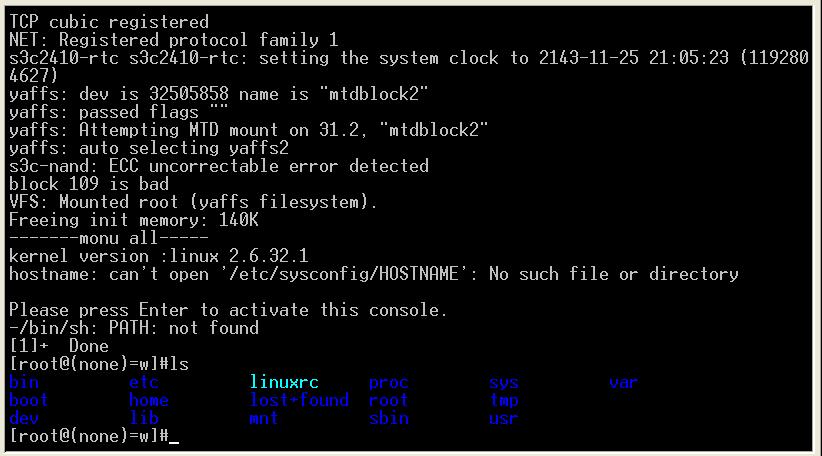
After applying the above changes, the root file system was successfully created. The boot screen appears as shown below:
Useful links:
http://www.lslnet.com/linux/dosc1/43/linux-300515.htm
http://topic.csdn.net/u/20110317/09/8f75cc2a-5c58-40cc-91c8-a356c9a77b48.html
Reference article: Porting yaffs2 root file system to MINI2440