Energy Storage EMS IoT Platform + Energy Storage Coordination Controller Solution
Background
Energy is a vital support for modern society. However, the finite nature of traditional energy resources and their environmental impact have sparked widespread attention to renewable energy. Renewable energy sources (such as solar and wind power) are characterized by volatility and intermittency, which necessitates an effective energy storage technology to balance energy supply and demand and improve energy utilization efficiency. Energy Storage EMS emerged as a response, an energy management system based on advanced technology, designed to optimize and manage energy storage equipment to achieve efficient energy storage and release.
Energy Storage EMS Product Features
Efficient Energy
-
Efficient Energy Flow Management: Energy Storage EMS can monitor and control the flow of energy, ensuring optimal distribution and utilization of energy within the energy storage system.
-
Optimized Energy Scheduling: Based on grid load demand and the state of the energy storage system, Energy Storage EMS intelligently schedules energy charging and discharging strategies, achieving effective energy utilization and optimal performance of the energy storage system.
-
Energy Forecasting and Optimization: Based on historical data and prediction algorithms, Energy Storage EMS can accurately predict future energy demand and optimize energy scheduling to reduce energy consumption and costs.
Intelligent Control
-
Charging Control Strategies: Based on grid requirements and the state of the energy storage system, Energy Storage EMS intelligently controls the charging rate, charging time, and charging mode to ensure the safe and efficient operation of the energy storage system.
-
Discharging Control Strategies: Energy Storage EMS can intelligently control the discharging rate, discharging time, and discharging mode based on grid demand and user requirements, to meet grid dispatching and user needs.
-
Energy Storage System Protection: Energy Storage EMS has monitoring and protection functions, capable of real-time monitoring the state and performance of the energy storage system, and taking corresponding protective measures in abnormal situations to ensure its safe operation.
Data Analysis and Monitoring
-
Real-time Data Monitoring: Energy Storage EMS can real-time monitor parameters such as current, voltage, and temperature of the energy storage system, providing comprehensive real-time data monitoring and alarm functions.
-
Data Analysis and Optimization: Energy Storage EMS can analyze and optimize historical data of the energy storage system, providing data reports and recommendations to help users understand energy consumption and optimize the performance of the energy storage system.
-
Remote Monitoring and Control: Energy Storage EMS supports remote monitoring and control functions, allowing users to remotely monitor the operating status of the energy storage system via mobile phone or computer, and perform real-time control and adjustments.
Feature List / Key Features
Project Homepage
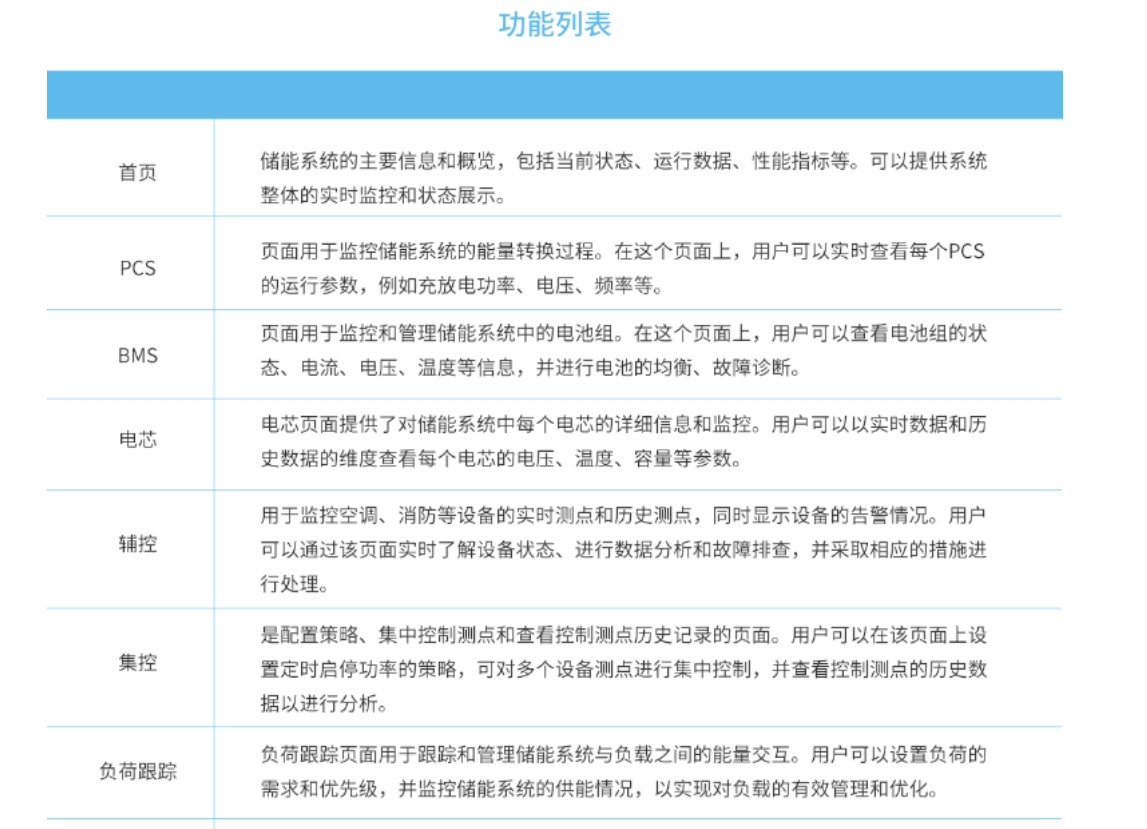
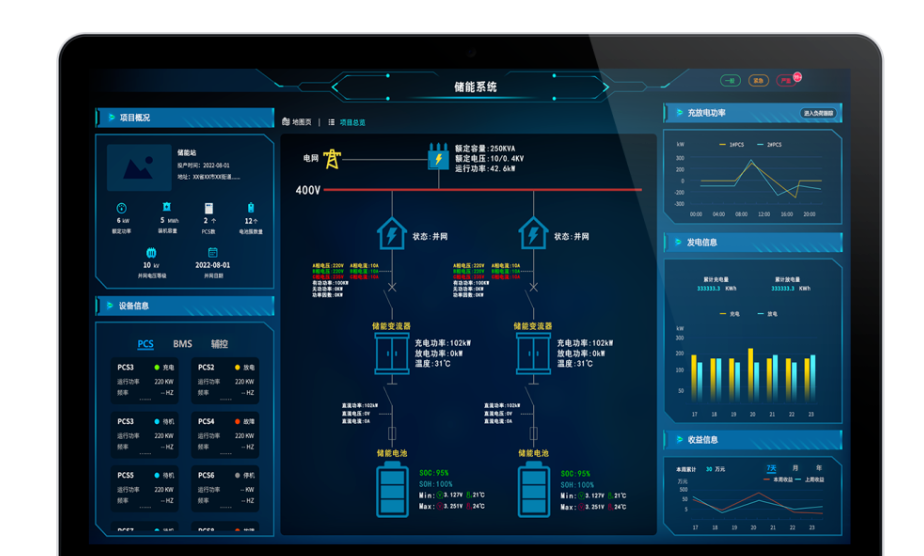
The homepage is the core information display page for the energy storage system. On the homepage, we can obtain key information such as the real-time status, operational data, and performance indicators of the energy storage system. Through real-time monitoring and status display, we can gain a comprehensive understanding of the operational status of the entire system. The homepage configuration displays the topological connection relationships between all project equipment, battery stacks, and battery clusters. Users can understand the architecture of the entire system and the connection methods between devices through this display, helping them real-time monitor and understand the overall operational status of the entire energy storage battery pack and the correlation between various components.
PCS
Users can view basic information about the PCS, monitor PCS alarms, monitor operating power, and obtain information on the DC and AC sides, allowing them to easily grasp the PCS status, troubleshoot problems, and optimize performance. The configuration displays the topological connection relationship between the current PCS and connected BMS units, allowing for a clear understanding of the connection configuration between the PCS and BMS.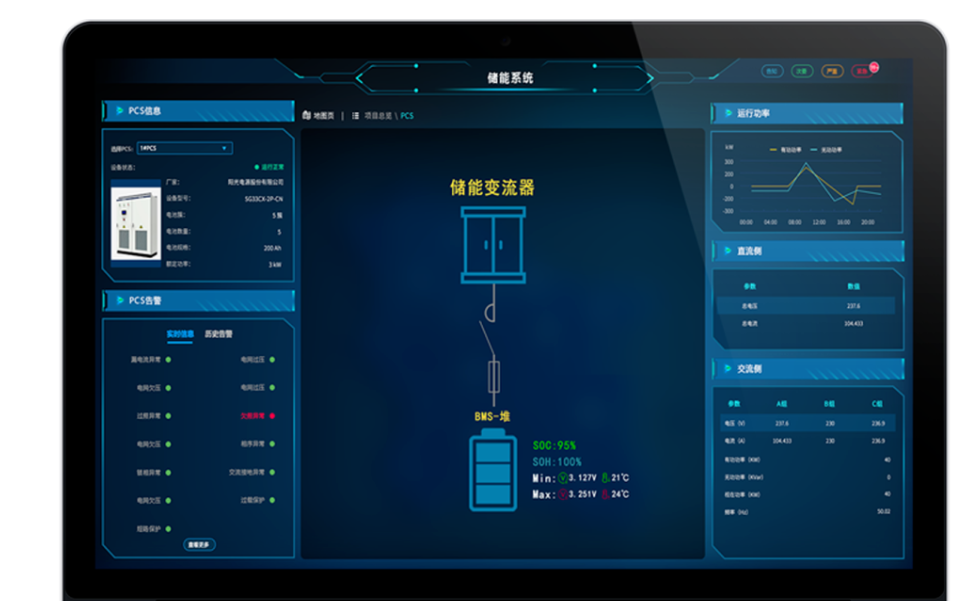
BMS
The BMS page is an important page for monitoring and managing battery clusters. It provides functions to display detailed information such as the status, current, voltage, and temperature of battery clusters. The configuration on the BMS page displays detailed information about the current BMS cluster. Users can view the parameters and alarm information of this BMS cluster for monitoring and managing the BMS.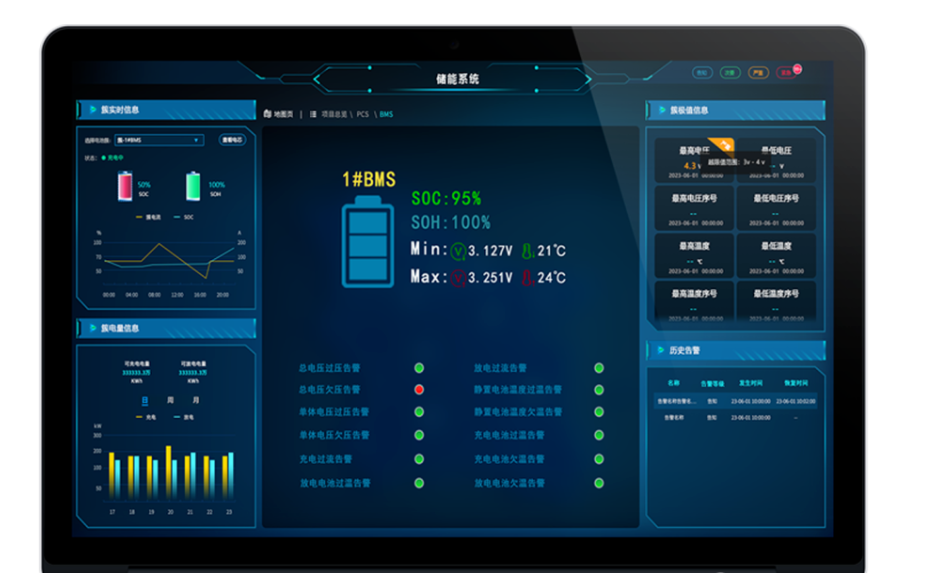
Battery Cell
The battery cell page provides viewing of real-time and historical data for each battery cell in the energy storage system. Users can view detailed information such as voltage, temperature, and capacity for each battery cell, and understand the evolution and trend of changes in the battery cells through historical data. A key feature of this page is its division into two sections: real-time data and historical data. Real-time data provides the current status of the battery cells, while historical data allows users to view detailed information about the battery cells over different time periods for comprehensive analysis and comparison.
System Configurability
The configuration center is a key page in the energy storage system used for managing and configuring system parameters and settings. Users can perform system initialization settings, parameter adjustments, and configure electricity prices and threshold values. This allows for flexible adjustments based on user needs and changes in the energy market, achieving personalized customization and optimization of the energy storage system.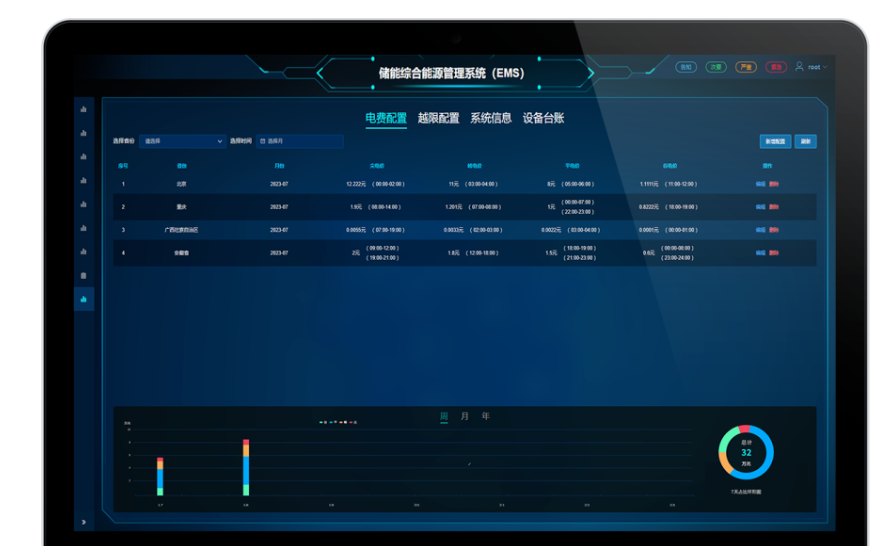
Project Power Consumption Monitoring and Tracking
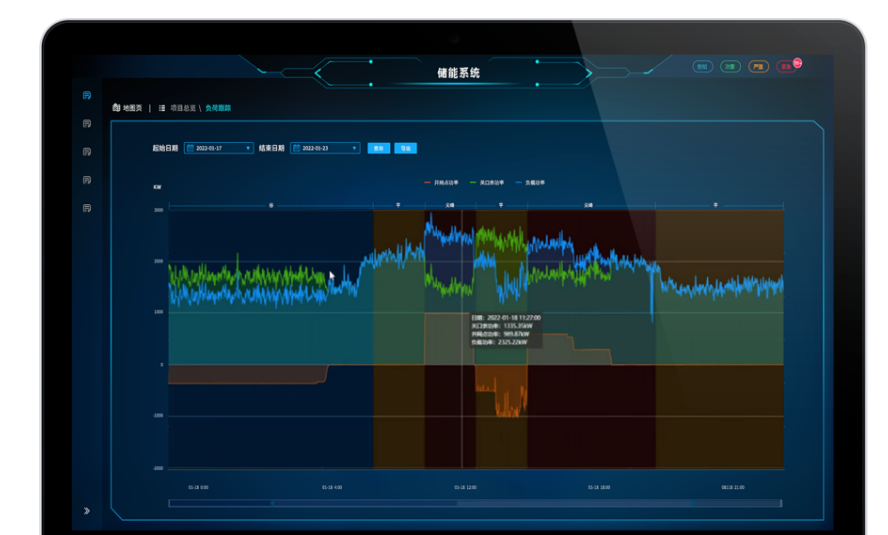
Load tracking monitors the power consumption load of the entire project. The page allows users to customize time ranges and view different power consumption patterns during peak, shoulder, off-peak, and valley periods in charts (the time slots for these periods can be configured in the configuration center). Users can select specific time periods based on their needs to better understand or compare load changes and power consumption patterns, facilitating adjustments according to their own requirements.
A key feature of this page is its flexible time filtering function, allowing users to select specific time periods for analysis based on their needs. The charts display power consumption patterns during peak, shoulder, off-peak, and valley periods, helping users optimize energy consumption and load management.