Illustrated Linux Boot Process
Overview
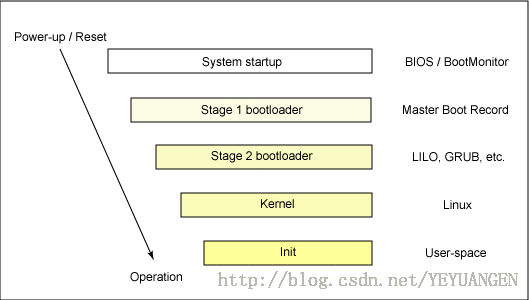
Figure 1: High-Level View of the Linux System Process
Stage 1 Boot Loader
The primary boot loader in the MBR is a 512-byte image containing program code and a small partition table (see Figure 2). The first 446 bytes constitute the primary boot loader, which includes executable code and error message text. The next 64 bytes form the partition table, containing records for 4 partitions (each record is 16 bytes in size). The MBR ends with two special bytes (0xAA55). This number is used to validate the MBR.
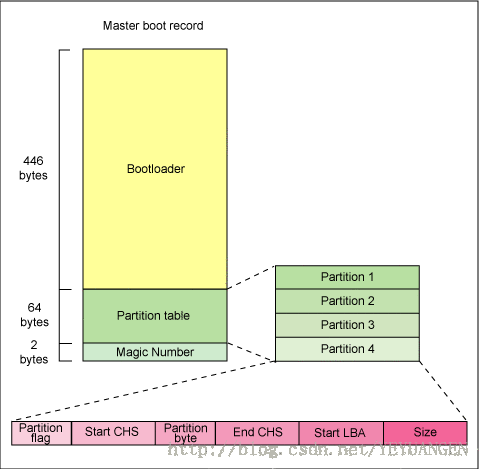
Figure 2: MBR Anatomy
Stage 2 Boot Loader
The secondary boot loader (Stage 2 boot loader) can be more aptly called the kernel loader. The task of this stage is to load the Linux kernel and the optional initial RAM disk.
GRUB Stage Boot Loader
The /boot/grub directory contains the stage1, stage1.5, and stage2 boot loaders, as well as many other loaders (e.g., iso9660_stage_1_5 for CD-ROMs).
A great thing about GRUB is its knowledge of Linux file systems. Unlike LILO, GRUB does not use raw sectors; instead, it can load the Linux kernel from ext2 or ext3 file systems. It achieves this by transforming the two-stage boot loader into a three-stage boot loader. Stage 1 (MBR) boots a Stage 1.5 boot loader, which can understand the special file systems containing the Linux kernel image. Examples include reiserfs_stage1_5 (to load from a Reiser journaling file system) or e2fs_stage1_5 (to load from an ext2 or ext3 file system). Once the Stage 1.5 boot loader is loaded and running, the Stage 2 boot loader can be loaded.
Once Stage 2 is loaded, GRUB can display a list of available kernels upon request (defined in /etc/grub.conf, along with several symbolic links like /etc/grub/menu.lst and /etc/grub.conf). We can select a kernel and even modify additional kernel parameters. Additionally, we can use a command-line shell for advanced manual control over the boot process.
After the Stage 2 boot loader is loaded into memory, the file system can be queried, and the default kernel image and initrd image are loaded into memory. Once these image files are ready, the Stage 2 boot loader can invoke the kernel image.
The Kernel
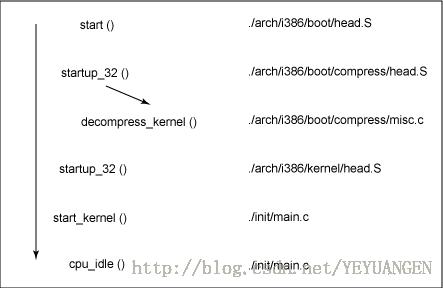
Figure 3: Linux Kernel i386 Boot Function Flow
By calling start_kernel, a series of initialization functions are invoked to set up interrupts, perform further memory configuration, and load the initial RAM disk. Finally, kernel_thread (in arch/i386/kernel/process.c) is called to start the init function, which is the first user-space process. Lastly, the idle task is started, and the scheduler can now take control (after calling cpu_idle). By enabling interrupts, the preemptive scheduler can periodically take control, thereby providing multitasking capabilities.
During the kernel boot process, the initial RAM disk (initrd) is loaded into memory by the Stage 2 boot loader, copied to RAM, and mounted onto the system. This initrd serves as a temporary root file system in RAM, allowing the kernel to fully boot without mounting any physical disks. Since modules required for interacting with peripheral devices can be part of the initrd, the kernel can be very small yet still support a large number of possible hardware configurations. After the kernel boots, the root file system can be formally set up (via pivot_root): at this point, the initrd root file system is unmounted, and the true root file system is mounted.
decompress_kernel Output
The decompress_kernel function is where the decompression message we typically see is displayed:
Uncompressing Linux... Ok, booting the kernel.
The initrd mechanism allows us to create a small Linux kernel that includes drivers compiled as loadable modules. These loadable modules provide the kernel with methods to access disks and file systems on them, as well as drivers for other hardware. Since the root file system is a file system on a disk, the initrd mechanism provides a boot method to gain access to the disk and mount the true root file system. In an embedded environment without a hard drive, the initrd can serve as the final root file system, or the final root file system can be mounted via a Network File System (NFS).
Init
Once the kernel has booted and initialized, it can launch its first user-space application. This is the first program called that is compiled using the standard C library. Prior to this, no standard C applications have been executed.
On a desktop Linux system, the first program launched is typically /sbin/init. However, this is not always the case. Few embedded systems require the rich initialization capabilities provided by init (which are configured via /etc/inittab). In many cases, a simple shell script can be invoked to start the necessary embedded applications.